

California's New Rule for Edited Listing Photos
California's new AB 723 forces disclosure on edited listing photos. Here's what counts as altered, what the law requires, and how to stay compliant.
The Sky Swap That Could Get You a Misdemeanor
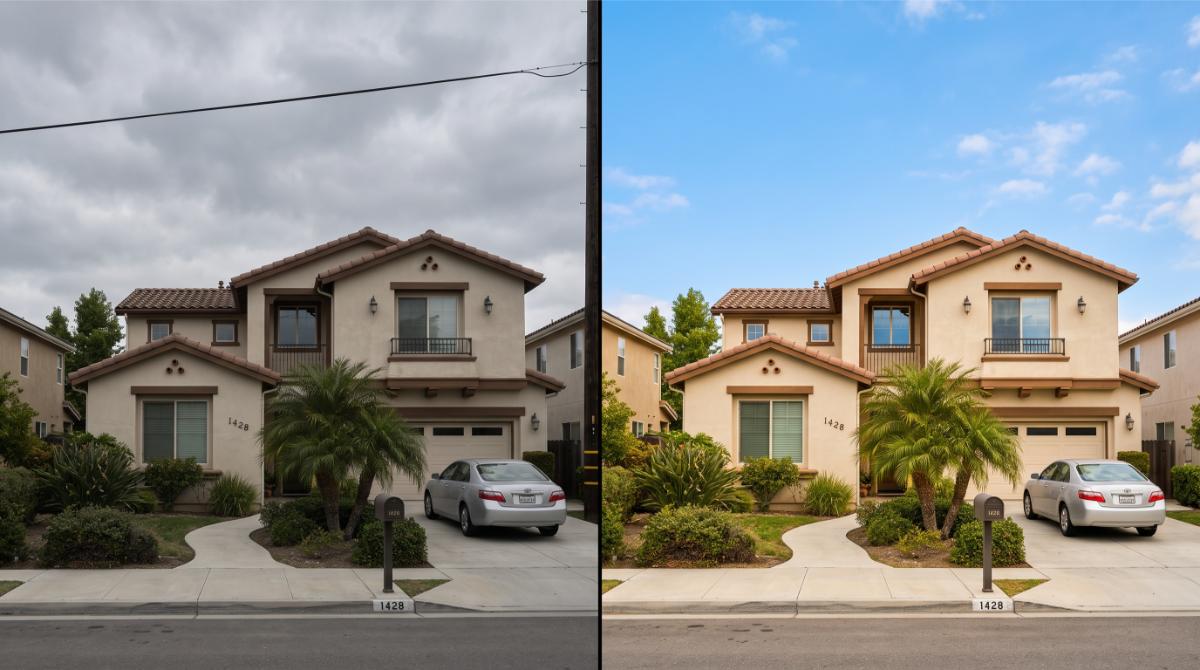
Somebody on your team pulled a power line out of a listing photo last week. Swapped a flat gray sky for something bluer. Made the lawn look like it hadn't given up in July. Nobody thought twice about it, because that's just what you do now. Except since January 1, 2026, that quick fix is a legal disclosure event in California, not a harmless touch up your broker mentioned once in a meeting everyone was half listening to.
The law is AB 723. It's been live for over six months, and a HousingWire study from late June found something worth sitting with. Across the four biggest real estate portals, roughly one in ten primary listing photos showed digital alteration. Over 90 percent of those had zero disclosure. Sky replacement was the single most common edit. If that's the industry average, your MLS compliance team already knows your brokerage is somewhere in that number.
What AB 723 Actually Says
The bill added Section 10140.8 to California's Business and Professions Code. In plain terms, if a broker, agent, or anyone acting on their behalf uses a digitally altered image in an ad or promotional piece, that image needs a reasonably conspicuous statement disclosing the alteration, plus a link, URL, or QR code pointing to the original, unedited photo. Not buried in a caption nobody reads. Next to the image, where a buyer actually sees it.
The law draws a real line between two kinds of edits. Cosmetic corrections, exposure, white balance, cropping, color correction, generally don't trigger disclosure. Edits that change what's physically represented in the photo do. That includes adding, removing, or altering furniture, fixtures, appliances, flooring, wall color, landscaping, exterior finishes, the view through a window, street features, or neighboring properties. If the edit changes what a buyer would see standing on the sidewalk, it counts.
This isn't a suggestion sitting quietly inside MLS ethics guidelines the way virtual staging etiquette used to. It's California Real Estate Law now, with the DRE holding enforcement authority that includes regulatory discipline, civil liability, and, for willful violations, criminal exposure. That last part isn't hyperbole. Multiple attorneys covering this law have flagged that a willful violation of real estate licensing statutes in California can be charged as a misdemeanor. That's a different conversation than an MLS compliance email asking you to swap a photo.
The Data Says Nobody's Actually Following It Yet
Here's where the HousingWire numbers get specific enough to matter for how you shoot and edit listings. Exterior photography showed alteration at nearly three times the rate of interior shots, 13.1 percent versus 4.5 percent. Living rooms and bedrooms followed at 6.4 percent and 5.9 percent, almost entirely driven by virtual staging. Kitchens barely registered. Bathrooms were close to zero across every portal studied.
Translation: the risk isn't evenly spread across a listing. It's concentrated in the exterior hero shot and the empty rooms your photographer virtually furnishes to make a vacant home feel livable. Those are exactly the images most likely to get the most views on Zillow, Redfin, and your own IDX feed, which means they're also the images most likely to end up in a complaint if a buyer feels misled after a showing that didn't match the listing.

Why This Hits Marketing Harder Than Compliance
Every brokerage conversation about AB 723 so far has framed it as a legal issue. It's also, quietly, a branding problem. We've said before that branding in a crowded market comes down to trust more than aesthetics, and there's no faster way to torch trust than a buyer standing in a driveway realizing the listing photo lied about the sky, the lawn, or the neighbor's fence.
Think about what happens downstream. A buyer drives an hour to see a home because the listing description and photos sold them on a vision that doesn't match reality. That's not just a wasted showing. That's a buyer who now assumes every other photo on your page is staged fiction too, and tells their agent that in the parking lot. Undisclosed edits don't just risk a DRE complaint. They erode the exact credibility your social media presence and Facebook ad campaigns are built to earn in the first place.
What This Actually Looks Like Day to Day
Nobody needs to stop editing photos. AB 723 doesn't ban virtual staging, AI touch ups, or enhancement. It bans doing it quietly. A few things worth building into your listing workflow this week:
- Confirm with your photographer or editor exactly which edits were cosmetic versus representational before the photos go live, don't assume you'll remember which lawn was real
- Add a visible disclosure label directly on or beside any altered image, not in the listing description three paragraphs down
- Keep the original, unedited photo accessible via a link or QR code the buyer can actually find, this is a requirement, not a nice to have
- Brief your team the same way you'd brief them on any new disclosure requirement, because "the editor did it" isn't a defense that holds up with the DRE
- Check your MLS's specific guidance, since interpretation of what counts as an edit can vary by system, and CRMLS in particular has already updated its rules to match the statute
The Bigger Pattern
AB 723 didn't arrive alone. It landed the same year as new electrical and disclosure rules on the transaction side, part of a broader push toward transparency that's reshaping how selling real estate in California works from the listing photo all the way through closing. Every year the state adds another layer, and every year the agents who treat it as a five minute compliance check outperform the ones who find out from a buyer's attorney.
This is also a moment where your marketing strategy and your legal exposure are the same document. Sponsoring a local event builds trust over months. One undisclosed sky swap can undo it in a single showing. If you've been tracking 2026 marketing trends and wondering what actually separates agents who are thriving from agents who are getting complaints filed against them, this is a real answer. It's not creativity. It's whether your listing photos say what actually happened to them.

One Practical Note Before You Panic
Precedent so far suggests the law applies to listings posted after January 1, 2026, not retroactively to anything already live before that date. But re-listed or reactivated properties should be treated as fully subject to the rule. If you've got an old listing sitting dormant that you're about to reactivate for a price change, that's the moment to audit the photos, not after a buyer asks a question you can't answer cleanly.
None of this is complicated once it's built into your process. It's only expensive when it's discovered after the fact, in a complaint, by someone who didn't need to explain the sky.
So look at your last three active listings right now. Any sky swaps in there? Any staged rooms without a label? If you're not sure, that's the actual test AB 723 just handed you.

California's New Electrical Disclosure, Explained
California sellers must now disclose electrical system issues under SB 382. Here's what changed and how to keep your disclosure packet clean.
The Form Nobody Reads Until Escrow Is Already Nervous
Somewhere in California right now, a buyer's agent is staring at a Transfer Disclosure Statement, pointing at a section that wasn't there last year, and asking their TC what it means. That section is SB 382. It's been law since January 1, 2026, and it's already showing up in almost every 1 to 4 unit residential transaction in the state. Most agents know something changed. Fewer can tell you what, or why it matters if the inspection gets skipped.
That gap is where deals get delayed. Not because the law is complicated. Because nobody explained it before the file landed in escrow.

What SB 382 Actually Requires
SB 382 amends California Civil Code sections 1102.6i and 1102.6j, and it applies to the standard TDS used in the sale of residential properties with one to four units, including mobile homes. The law does two specific things. First, if a seller or their agent knows about state or local rules requiring the future replacement of gas powered appliances tied to the property, they have to put that in writing. Second, it adds a statutory notice pushing the buyer toward an electrical system inspection before they close.
Notice what it does not do. It does not force a seller to rip out an old panel before listing. It does not mandate an inspection. It's a disclosure and advisory law, built to get information in front of buyers before they're signing loan documents, not a renovation mandate. If you're the one prepping the disclosure packet, that distinction matters when a nervous seller calls asking if they need to spend money before listing. They don't. They need to be honest about what they know.
The bill was sponsored by the Bay Area Air Quality Management District, which tells you where the pressure came from. Electrification. EV chargers, heat pumps, induction ranges, solar batteries. Older panels weren't built for that load, and the state decided buyers deserve to know before they own the problem.
Why This Isn't Just Another Line on the TDS
Here's the part that should actually get your attention if you're coordinating files day to day. This law didn't stay contained to the TDS. C.A.R. folded a related advisory directly into Paragraph 11(E) of the Residential Purchase Agreement, encouraging buyers to get an electrical inspection because of safety risk and insurance exposure. That's a form nearly every California transaction touches, on both the buyer and seller side.
Insurance is the quiet reason this matters more in 2026 than it would have five years ago. Carriers are already tightening underwriting on older homes across the state, and outdated wiring is one of the fastest ways to get flagged during an insurance inspection after close, not before. If your buyer skips the electrical inspection and the panel becomes a binder problem three weeks post-close, that's not a paperwork issue anymore. That's a phone call nobody wants to make.
This is exactly the kind of shift we flagged when we wrote about why California escrows are taking longer in 2026. Every new disclosure requirement adds a checkpoint. Checkpoints add days. Days add stress to a timeline that was already tight.
Where TCs Actually Get Tripped Up
The mistake isn't usually ignorance of the law. It's timing. A TC builds the disclosure packet early, before the listing agent has confirmed whether the seller knows of any local gas appliance replacement ordinance. Nobody follows up. The packet goes out incomplete, the buyer's agent catches it two weeks later, and now you're amending a TDS that's already been signed and initialed. That's an awkward conversation with a seller who thought they were done.
Sound familiar? It's the same failure mode we described in the AVID form agents rush and then regret. Disclosure forms don't fail because agents don't care. They fail because everyone assumes someone else already asked the hard question.
A few things worth building into your intake checklist right now:
- Ask the listing agent directly whether the seller has knowledge of any local ordinance requiring gas appliance replacement, don't assume the TDS software will flag it automatically
- Confirm the electrical inspection advisory language is actually present in the executed RPA, not just referenced in an addendum
- Flag any home over 30 years old for an electrical panel conversation before the disclosure packet goes out, not after
- Keep a paper trail showing the buyer was notified of their right to request an inspection, even if they waive it
None of this is complicated. It's just one more item competing for attention in a file that already has a TDS, an NHD, an SPQ, and a dozen other acronyms fighting for the same five minutes of everyone's day.
The Bigger Pattern Here
SB 382 isn't an isolated law. It's part of a run of 2026 disclosure additions, alongside new requirements around digitally altered listing photos and thirdhand smoke residue, all landing in the same TDS packet within months of each other. If you've felt like the disclosure process got heavier this year without anyone sending a clear memo, that's not a feeling. That's what actually happened.
This is also exactly why the hidden costs of DIY transaction coordination keep climbing. An agent juggling their own paperwork in 2023 could reasonably keep up. An agent doing that in 2026, tracking SB 382, the smoke disclosure, the photo editing rule, and the federal cash reporting requirement that just went live in March, is one missed update away from a canceled deal or worse, a lawsuit that surfaces eighteen months after close.
We've watched agents try to manage this solo and end up exactly where we described in what happens when your TC ghosts you mid-transaction. Except in this case, there's no ghosting TC to blame. It's just an overloaded agent who didn't know the form changed.

What This Means If You're Still Deciding Whether You Need Help
If you're an agent handling five or six files a month on your own, one new disclosure law is annoying but manageable. If you're handling ten, fifteen, twenty, the math changes fast. Every new form, every new advisory paragraph, every new signature requirement multiplies across every open file simultaneously. That's the exact tipping point we walked through in when to hire a TC: 7 signs you're ready. SB 382 alone won't push you there. SB 382 stacked on top of everything else California added this year, combined with a full pipeline, absolutely will.
And if you're already working with a coordinator, this is a good moment to ask a blunt question. Are they actually tracking new disclosure law as it lands, or are they running the same checklist they built in 2023 with a few patches taped on? There's a real difference between a TC who mentions SB 382 unprompted and one who finds out about it from your buyer's agent. That gap is worth positioning clearly when you're explaining to clients why coordination fees are worth paying, not something to bury in the fine print.
None of this changes because California is, as we've said before, unlike anywhere else when it comes to disclosure volume. New laws arrive every January. The C.A.R. forms library gets updated multiple times a year to keep pace, most recently with a mid-year release in June covering the RPA, the buyer representation agreement, and disclosure paragraphs directly tied to this law. Falling behind on any of it isn't a small mistake. It's the kind of mistake that surfaces as a lawsuit long after everyone's forgotten which form they signed.
One More Thing Worth Saying Out Loud
Insurance carriers are watching electrical panels closer than they were two years ago, and that's not going to reverse. The Insurance Information Institute has flagged aging home electrical systems as a growing driver of both fire risk and coverage denials, which means the disclosure conversation you have with a seller today is also, quietly, a conversation about whether their buyer can even get coverage at close. That's a bigger deal than a line item on a form. Treat it that way.
Contingency removal mistakes get all the attention because they're dramatic and they kill deals in real time. Disclosure gaps are quieter. They don't blow up escrow, they blow up eighteen months later in a courtroom, which is exactly why we spent so much time on the contingency removal mistakes that kill California deals and why the same discipline applies here. Get it right the first time. Nobody remembers the deal that closed clean. Everyone remembers the one that didn't.
So here's the actual question. When's the last time you checked whether your current TDS template even has the SB 382 language built in, or are you still working off last year's file?
.jpg)
Why Your "Meet the Agent" Page Isn't Building Any Trust
A headshot and a list of certifications isn't a bio. Here's why your About page is quietly costing you leads, and the specific things that actually make a stranger t
Pull up your About page right now. Read the first sentence out loud.
If it starts with "I have always had a passion for real estate" or "Born and raised in [city], I decided to pursue a career in real estate because," stop. You've just described roughly eighty percent of every agent bio on the internet, and you've told a stranger nothing they actually needed to know before deciding whether to trust you with the biggest financial decision of their year.
Most agent About pages read like a resume nobody asked for. Years licensed, a list of designations, a paragraph about loving the community, a photo where you're smiling with your arms crossed in front of a listing. It looks professional. It also does almost nothing to move a visitor from "this seems like a real person" to "I'd trust this person to handle my transaction."
Trust isn't built by stating you're trustworthy. It's built by giving someone specific, verifiable reasons to believe it, and most bio pages skip straight past the reasons and go directly to the claim.
The Difference Between a Bio and a Credibility Document
A bio tells a story about you. A credibility document proves you can do the job. Your About page needs to function as the second thing while still reading like the first.
Think about what a visitor is actually trying to figure out when they land on this page. They're not curious about your childhood or your love of weekend hikes. They're trying to answer one question, quickly: is this the kind of person who will handle a six-figure transaction competently and look out for me specifically? Everything on the page should be evaluated against whether it helps answer that question.
Research from Nielsen Norman Group on how people evaluate web credibility consistently finds that specific, verifiable social proof outperforms generic self-description by a wide margin. A visitor doesn't believe you're trustworthy because you said so. They believe it because you gave them evidence, in the form of numbers, outcomes, and specifics they could theoretically check.
This means the humanizing, personal parts of a bio still matter. A page that reads like a court deposition of your transaction volume is just as forgettable as one that reads like a diary entry. The trick is sequencing the credibility first and the personality second, not leading with personality and hoping the credibility shows up eventually if the visitor keeps scrolling.
Why "Passionate" and "Dedicated" Mean Nothing
Every unhelpful bio uses the same handful of words. Passionate. Dedicated. Hardworking. Client-focused. Committed to excellence. These words appear so frequently across every industry, not just real estate, that they've become functionally invisible. A visitor's brain skips right over them the same way it skips over "terms and conditions apply" at the bottom of an ad.
The problem isn't that these words are false. You probably are dedicated. The problem is that the word "dedicated" carries zero information. It doesn't distinguish you from any other agent making the same claim, and it doesn't give a skeptical visitor anything to evaluate.
Compare "I'm dedicated to getting my clients the best possible outcome" against "Last year I negotiated repair credits on 9 out of 11 transactions where the inspection turned up issues, saving my clients an average of $4,200 per deal." The second sentence never uses the word dedicated. It doesn't need to. The specificity does the work the adjective was trying and failing to do.
If you find yourself using words like passionate, dedicated, or committed anywhere on your About page, that's the signal to stop and ask what specific thing you actually did that would make someone believe that claim without you having to state it directly.

What Actually Belongs on This Page
A strong About page has a handful of distinct sections, each doing a specific job, in a specific order. Skipping the order matters as much as including the content, because credibility has to be established before personality gets to land.
Open with a results-oriented statement, not a personal history. The first sentence should establish what you do and for whom, ideally with a number attached. "I've helped 63 families buy and sell homes across the East Bay since 2019" does more in one sentence than three paragraphs of backstory. Save the origin story for later, if you include it at all.
Follow with specific transaction context. Not just years licensed, but what kind of transactions, in what price range, in what specific areas. "I specialize in first-time buyers in the $500k to $750k range in Sacramento County" tells a visitor immediately whether they're a fit for your expertise, which matters more than a generic claim of full-service competence in every category.
Include a credentials section that's actually specific. Designations matter less than most agents think, but transaction volume, notable outcomes, or specialized training genuinely do. If you've closed deals during unusual circumstances, probate sales, complex 1031 exchanges, new construction, say so specifically. Vague credential lists ("licensed since 2015, member of NAR, CRS designation") tell a visitor you checked some boxes. Specific outcomes tell them you can handle their exact situation.
Add a short, human paragraph, but make it earn its place. This is where personality belongs, and it should be genuinely specific rather than generically warm. Not "I love spending time with my family and exploring the outdoors." Something a real person would actually say: "I grew up watching my parents lose their first house to a bad inspection they didn't understand, which is part of why I walk every client through every page of the inspection report before they sign anything." That sentence does double duty. It's human, and it reinforces a specific credibility claim at the same time.
Close with a clear next step. Not a vague "feel free to reach out." A specific, low-friction action. "Text me directly at [number] if you want a straight answer about whether now is the right time to sell" gives a visitor permission to take the exact action you want, phrased in a way that feels personal rather than transactional.
The Photo Problem Nobody Talks About
Most agent headshots are technically fine and functionally useless. A studio portrait, arms crossed, professional smile, slightly too polished lighting. It looks like every other agent headshot in the market, which means it does nothing to differentiate you and, worse, it can read as slightly impersonal in a way that undercuts the trust-building goal of the page.
Nielsen Norman Group's research on photo authenticity in web credibility found that generic stock-style photography is consistently rated as less trustworthy than candid, situational photography, even when the subject is the same person. A photo of you mid-conversation with a client, or standing in a neighborhood you actually work, tells a visitor more about who you are than a studio portrait does, because it shows you doing the thing rather than posing for a claim about doing the thing.
This doesn't mean your primary photo needs to be unprofessional. It means the full page benefits from a mix: one clean, well-lit professional photo for immediate identification, paired with one or two candid, in-context images further down the page that show you actually working. An agent standing in an empty room mid-walkthrough gesturing to something off-frame, or crouched inspecting a foundation detail, communicates competence and hands-on presence in a way a posed studio shot never will.

Third-Party Proof Beats First-Person Claims Every Time
Anything you say about yourself carries less weight than the same claim made by someone else. This is the entire logic behind testimonials, and most agent About pages either skip them entirely or bury a single generic quote at the bottom.
A testimonial that says "Sarah was amazing to work with!" does almost nothing. A testimonial that says "Sarah caught an issue in our disclosure package that our first agent never mentioned, and it saved us from a $15,000 repair surprise after closing" is a completely different piece of evidence. It's specific, it's checkable in spirit even if not literally verifiable, and it reinforces a concrete competency rather than a vague positive feeling.
If you don't currently have testimonials this specific, the fix isn't to make something up. It's to ask better questions when requesting a review. Instead of "would you leave me a review," ask a past client "what's one specific thing that surprised you about working with me, good or bad?" The answers you get from that question are dramatically more usable than what comes from a generic review request.
According to research from the Spiegel Research Center on online reviews, the presence of reviews increases conversion rates significantly, but the effect is strongest when reviews are specific and detailed rather than short and generic. A page with three detailed, specific testimonials outperforms a page with fifteen one-line "great agent!" quotes.
Beyond client testimonials, third-party proof also includes any legitimate external validation: production awards from your brokerage, if they're real and current rather than five years stale, press mentions if you've genuinely been quoted somewhere, and speaking engagements or panel appearances if applicable. Google's guidance on evaluating page authority, referred to as E-E-A-T, places real weight on third-party signals of expertise and trustworthiness, which means these elements aren't just persuasive to human visitors, they can genuinely help the page's search performance too.
The Specificity Test You Can Run Right Now
Here's a fast way to audit your current About page. Go sentence by sentence and ask: could this exact sentence, word for word, apply to any other agent in my market? If the answer is yes, that sentence isn't doing any work.
"I'm committed to providing exceptional service" could apply to literally anyone. Delete it or replace it with something specific to you.
"I've closed 40 transactions in the Elk Grove area since 2021, with 60 percent of my business coming from repeat clients and referrals" could not apply to anyone else. That's your sentence.
Run this test across your entire page. Most agent bios fail it in the first paragraph and never recover, because the generic language sets a tone the rest of the page follows. Fixing just the opening two or three sentences, replacing vague claims with specific numbers and outcomes, often does more to improve the page's effectiveness than a full redesign would.
Where This Page Fits Into the Rest of Your Site
Your About page doesn't exist in isolation. It's one part of the trust-building system your homepage starts and your contact page is supposed to finish. A visitor who arrives skeptical, gets convinced by a specific, credible About page, and then hits a contact page that undermines that trust with friction or vagueness has still lost the conversion, even though the About page itself did its job.
The same logic applies in reverse. If you've built a brand-first website that leads with results and client stories rather than IDX search functionality, your About page is one of the core pages carrying that entire strategy. It needs to be as strong as your past sales section and your testimonials section, because for a lot of visitors, this is the page that decides whether they reach out at all.
Internal linking matters here too. If you've written neighborhood-specific content, your About page should link to it where relevant, reinforcing the specific local expertise claims you're making about yourself. A bio that claims deep knowledge of a specific area is more credible when it links directly to detailed, original content proving that knowledge exists.
Writing It in Your Actual Voice
One last thing worth saying directly: an About page written in a voice that doesn't sound like you undermines the entire exercise, no matter how specific and credible the content is. If a client met you in person after reading a stiff, overly formal bio, and you turned out to be warm and a little irreverent in real life, the mismatch itself creates a small trust gap. People notice when the version of you on the page doesn't match the version of you on the phone.
Write the page the way you'd actually talk if a friend asked you what makes you good at your job. Most people, when asked that question directly, don't reach for "passionate" and "dedicated." They say specific things. "I'm annoyingly thorough about contracts because I've seen what happens when people aren't." "I answer texts fast because I hated waiting on my own agent when I bought my first place." Those sentences sound like a person. Use that voice on the page instead of the version that sounds like it was written for a brokerage recruiting brochure.
The Rewrite Is Worth an Afternoon
Fixing an About page doesn't require a new photoshoot, a rebrand, or a developer. It requires sitting down for an afternoon and replacing every vague claim with a specific one, adding at least two or three real, detailed testimonials if you don't already have them, and reordering the page so credibility comes before personality.
That's the whole project. No new technology, no new design, just a rewrite grounded in specifics instead of adjectives.
Go read your current About page one more time, out loud, as if you were a stranger deciding whether to trust someone with the sale of their home. If it doesn't convince you, it isn't convincing anyone else either.

Sponsoring Local Events: What Actually Converts to Clients
Your logo on a banner isn't a strategy. Here's the difference between sponsorships that quietly build your pipeline and ones that just make you feel involved.
You sponsored the fall festival. Your logo sat on a banner between a dentist and a pest control company for six hours. You handed out maybe forty pens. Three months later, you can't point to a single client who came from it.
You're not alone, and you're not bad at this. Most agents sponsor things the same way: write a check, get a logo placement, show up if there's time, and hope something trickles back. It rarely does, not because sponsorship doesn't work, but because the version most agents do isn't actually built to convert anything. It's built to feel like marketing without requiring the harder work marketing actually requires.
Some sponsorships genuinely turn into a steady pipeline of listings and referrals. Others are just a tax write-off with a banner attached. The difference isn't the size of the check. It's what happens before, during, and after the event, and almost nobody thinks past the check part.
Why Logo Placement Alone Does Almost Nothing
A logo on a banner, a program, or a step-and-repeat backdrop is a passive impression. Someone glances at it, maybe registers your name for half a second, and moves on with their day. Passive impressions build brand familiarity over a very long timeline, but they don't generate a phone call. Nobody has ever finished a 5K, looked at the sponsor banner, and called the agent whose logo was next to the water station.
Research on advertising exposure from the Journal of Consumer Research consistently shows that repeated, passive brand exposure builds recognition slowly, over many exposures, not a single event. A banner at one festival is one exposure. If that's the entirety of your sponsorship strategy, you're playing a long game with a single move, and expecting a short-game result.
The agents who get real business from sponsorships understand that the sponsorship itself is just the entry ticket. The actual conversion mechanism has to be built on top of it, deliberately, the same way you'd build a lead magnet or a landing page. A logo is not a lead magnet. It's wallpaper.
The Sponsorship Types Ranked by Actual Conversion Potential
Not all sponsorships are created equal, and the difference usually comes down to how much direct interaction you get with attendees, not how much visibility your logo gets.
Low conversion potential: banner or program ad placement with no attendee interaction. You paid, your name appeared, nobody talked to you. This is closer to brand advertising than lead generation, and it should be treated and budgeted accordingly. It's fine as a goodwill gesture. It should never be your primary sponsorship strategy.
Medium conversion potential: a booth or table at the event where you're physically present and can have conversations. This is meaningfully better because you control the interaction, but only if you're doing something at the booth besides standing there. A folding table with business cards and a bowl of candy generates about as much as the banner did.
High conversion potential: you're the reason the event exists, or a core part of its programming. Hosting a free home valuation booth with actual on-the-spot value. Running the raffle. Being the one handing out prizes to kids, which means every parent has a positive interaction with you specifically, not just your logo. Sponsoring in a way that gives you a mic, a table people actually stop at, or a reason for someone to seek you out during the event rather than just walk past your name.
The jump from low to high conversion potential isn't about spending more money. It's about spending the same money differently, on presence and interaction instead of passive placement.

Match the Event to Your Actual Business, Not Your Personal Interests
A lot of agents sponsor things they personally enjoy. They like softball, so they sponsor the softball league. They have kids in a specific school, so they sponsor the school fundraiser. There's nothing wrong with that instinct, but it should be a secondary filter, not the primary one.
The primary filter should be: does this event put me in front of people who are demographically and situationally likely to buy or sell a home in the next 12 to 24 months? A youth sports league puts you in front of parents, many of whom are homeowners with kids, some of whom are exactly the move-up buyer profile who outgrows a starter home around the time their kids hit middle school. That's a strong match.
A brewery's trivia night puts you in front of a broad, mixed crowd with no particular connection to real estate decisions. Fun, but weaker as a lead source unless you're specifically targeting a younger first-time buyer demographic that skews toward that scene.
The National Association of Realtors' research on buyer demographics breaks down who's actually buying and selling by age, family status, and life stage. Cross-reference that against the crowd an event actually draws before committing sponsorship dollars. A school fundraiser, a Little League season, a neighborhood HOA's annual event, a senior center's activities calendar if you specialize in downsizing clients, all of these have a built-in demographic alignment that a general community festival often lacks.
What to Actually Do at the Event
Showing up is the baseline, not the strategy. Once you're there, the event needs to generate something you can follow up on later, which means you need a mechanism for capturing contact information that doesn't feel like a sales pitch in the moment.
A raffle works well because it's genuinely fun for attendees and gives you a legitimate reason to collect a name, email, and phone number. "Enter to win a $100 gift card to [local restaurant]" is an easy ask that most people will say yes to, especially if you're standing right there making it a friendly, low-pressure interaction rather than a form shoved at them.
A free, specific piece of value works even better if you can pull it off. Bring printed market snapshots for the immediate area if you're sponsoring a neighborhood-specific event, or offer instant home value estimates on the spot for anyone who wants one. This does double duty: it gives people a reason to walk up to your table specifically, and it naturally starts the conversation about their home or their neighborhood, which is exactly the conversation you want to be having.
Whatever you do, don't make the interaction about pitching your services directly. Nobody at their kid's soccer game wants to hear about your listing pipeline. They want the raffle entry, the market snapshot, or the free popsicle you're handing out on a hot day. The sales conversation happens later, after the follow-up, not at the table.
The Follow-Up Is Where Sponsorships Actually Convert
This is the step almost every agent skips, and it's the single biggest reason sponsorships feel like they don't work.
You collected forty names and emails at the fall festival. What happened to them? If the answer is "they're sitting in a spreadsheet I haven't opened," the sponsorship didn't fail. The follow-up did.
Every contact from a sponsored event should go into your CRM within 48 hours, tagged specifically by the event they came from, not dumped into your general contact list undifferentiated from your open house sign-ins and your Zillow leads. If your CRM has been collecting dust, a pile of untagged sponsorship contacts is exactly the kind of thing that quietly disappears into it.
The follow-up message itself should reference the event specifically, not read like a generic drip email. "Thanks for stopping by our table at the fall festival, hope your family had a great time" is a completely different opening than a cold "Hi, I'm a local real estate agent." The event gives you a legitimate, non-awkward reason to be in someone's inbox, and that reason expires fast if you don't use it within a few days.
From there, these contacts belong in a long-term nurture sequence, not a hard sales push. Most people you meet at a community event are not actively buying or selling right now. They're homeowners, parents, neighbors. The value of the relationship compounds over months, the same way your past client and sphere nurture does, through consistent, low-pressure touchpoints rather than one aggressive follow-up call.

The Recurring Sponsorship Beats the One-Off
A single sponsorship of a one-time festival is a single data point. Sponsoring the same organization's recurring events, the same Little League season year after year, the same school's annual fundraiser, the same farmers market booth every Saturday for a season, builds something a one-off never can: familiarity that compounds.
By year two of sponsoring the same youth sports league, you're not the new logo on the banner anymore. You're the agent who's been there every season. Parents who see you at pickup, at games, at the season-end party, start to actually know your face, not just recognize your name from a sign. That's the difference between passive brand exposure and something closer to a genuine community relationship, and it's the version of sponsorship that actually generates referrals, because people refer people they feel they know, not people whose logo they've seen a few times.
HousingWire has covered how consistency in community-facing marketing outperforms one-off campaigns for exactly this reason. The compounding effect of showing up in the same place, for the same community, over an extended period, builds trust in a way that no single sponsorship, however well executed, can replicate on its own.
If you're already thinking about your broader farming strategy for a specific neighborhood, recurring local sponsorships within that same farm area are one of the strongest complements to postcards and digital farming. A homeowner who's received your market reports for a year and also sees you sponsoring the same neighborhood block party every summer is getting reinforcement from two directions at once.
Sponsorships That Skew Toward Sellers vs Buyers
Not every sponsorship needs to target the same audience, and being intentional about which lever you're pulling helps you measure whether it actually worked.
Homeowner-heavy events, HOA gatherings, neighborhood block parties, local garden club events, tend to skew toward an audience closer to a seller conversation. These are people who already own, and your presence there is more naturally framed around market value, neighborhood trends, and the "what's my home worth" conversation.
Family and youth-oriented events, school fundraisers, youth sports, community center kids' programs, tend to include a mix of renters who might be first-time buyers and homeowners who might be move-up buyers as their family grows. The framing here leans more toward buyer-side content: what's happening with rates, what buyers in this specific area are actually getting for their money right now, general market accessibility questions.
Knowing which lever you're pulling before you sponsor helps you prepare the right follow-up content and set realistic expectations for what kind of leads will actually come out of it. A seller-focused sponsorship that generates a list of first-time renter contacts isn't a failure, it's just a different kind of lead than you were expecting, and your follow-up sequence should be built for the audience you actually got, not the one you hoped for.
What This Actually Costs and What Return to Expect
Local event sponsorships typically range from a couple hundred dollars for a small school fundraiser table to a few thousand for a title sponsorship of a larger community festival with your name in the event title itself. Neither end of that range guarantees anything on its own.
Budget for the sponsorship itself, but also budget time and a small amount of additional spend for the conversion mechanism: raffle prizes, printed market snapshots, follow-up email or mail campaigns to the contacts you collect. An agent who spends $300 on a booth and $50 on raffle prizes but treats the follow-up seriously will typically outperform an agent who spends $2,000 on a title sponsorship banner and does nothing else.
Track it the same way you'd track any other lead source. Tag every contact by event, note when they close, and calculate your actual cost per lead and cost per closed transaction over a 12 to 18 month window, since community relationship building rarely converts on a fast timeline. If you're not tagging and tracking, you'll never actually know whether a specific sponsorship is worth renewing next year, and you'll end up making that decision based on vague feelings about whether the event "seemed like a good vibe" rather than actual data.
Start Small and Prove the Mechanism Before You Scale
You don't need to sponsor five events this year to test whether this works for your business. Pick one event that matches your target buyer or seller demographic well, show up with an actual interaction mechanism instead of just a banner, tag and follow up with every contact you collect, and measure what happens over the following year.
If it produces even one or two real transactions from a few hundred dollars of sponsorship and a handful of hours at a table, you've found a repeatable channel worth scaling into a recurring, multi-event annual sponsorship calendar. If it produces nothing after genuinely following up, the problem probably wasn't the sponsorship. It was the interaction mechanism or the follow-up, and those are fixable without abandoning the whole approach.
The banner was never going to bring the client. The conversation at the table, and what you did with their contact information afterward, was always where the actual business was going to come from.
What's the next local event on your calendar, and do you actually have a plan for what happens after it ends?

Landing Pages vs Your Homepage: Why Paid Traffic Needs Its Own Front Door
You paid for the click. Your homepage is about to lose it. Here's why paid traffic converts at a fraction of its potential when it lands somewhere built for everyone
You ran the ad. Someone searching "sell my house fast Sacramento" saw it, clicked it, and landed on your homepage.
Now they're staring at a hero image of you smiling in front of a house, a navigation bar with nine menu items, a rotating carousel of featured listings that have nothing to do with what they searched, and a headline that says something like "Your Trusted Real Estate Partner." Somewhere below the fold, buried behind two scrolls, is maybe a mention of home valuations.
They close the tab. You paid for that click. You got nothing back.
This happens constantly, and most agents never notice because the ad platform still reports the click as a success. The money left your account, the traffic showed up, the analytics dashboard says visitors arrived. What it doesn't tell you, at least not obviously, is that the destination page was built for a different job entirely, and that mismatch is where your ad budget quietly disappears.
Two Pages With Two Completely Different Jobs
A homepage and a landing page look similar. Both have your branding, both have a headline, both probably have a photo of you or a property. But they exist to do fundamentally different work, and treating them as interchangeable is where most of this problem starts.
Your homepage is a hub. Its job is to orient a visitor who arrived without a specific intention yet. Maybe they heard your name from a friend. Maybe they found you through an organic Google search for your name. Maybe they're a past client checking if you're still active. That visitor doesn't know exactly what they want from your site, so the homepage has to offer multiple paths: buyer info here, seller info there, a blog, a contact page, an about page. It's built for breadth.
A landing page is a funnel. Its job is to take a visitor who already has a specific intention, formed the moment they clicked your ad, and move them toward exactly one action. No multiple paths. No broad audience. One visitor type, one message, one next step.
When you send someone who clicked "free home valuation" to your homepage, you've taken a visitor with a narrow, specific intent and handed them a hub built for everyone. They have to hunt for the thing they came for. Most people don't hunt. They leave.
According to Unbounce's landing page benchmark report, dedicated landing pages convert visitors at meaningfully higher rates than homepages receiving the same paid traffic, specifically because they remove the decision paralysis of a multi-purpose page. The difference isn't cosmetic. It's structural.
The Cost Nobody Notices Until They Calculate It
Here's the part that should actually sting a little. If you're running Google Ads or Facebook ads and sending every click to your homepage, you're not just losing conversions. You're paying more per click than you need to.
Google's Quality Score system factors landing page relevance directly into how much you pay for each click. An ad about "homes for sale in Roseville under $600k" that sends traffic to a generic homepage scores lower on relevance than the same ad sending traffic to a Roseville-specific page built around that exact price range. Lower relevance score means higher cost per click for the same ad position. You're paying a premium to send people somewhere that doesn't match what you promised them.
Run the math on this for a month. If your cost per click goes up 20 to 30 percent because your landing experience doesn't match your ad, and your conversion rate on that mismatched page is also lower, you're losing on both ends of the same transaction. The ad platform is charging you more to deliver a worse experience that converts at a lower rate. That's not a small leak. That compounds every single day the campaign runs.
What a Real Landing Page Actually Contains
A landing page strips away almost everything a homepage has, on purpose.
Start with navigation. Your homepage needs a full menu because visitors are exploring. A landing page should have little to no navigation at all, because every link is an exit ramp away from the one action you want. If someone clicked an ad for a free market report and your landing page still has a menu bar with "Buyers," "Sellers," "Blog," "About," and "Contact," you've given them five ways to wander off before they've done the one thing you actually paid to get them to do.
The headline on a landing page should mirror the promise from the ad almost exactly. If your ad said "See what homes are actually selling for in your neighborhood," your landing page headline should restate that same promise in nearly the same words. This is called message match, and it matters more than most agents realize. A visitor who clicks an ad and lands on a page with a different headline experiences a split second of doubt: did I click the right thing? That doubt costs conversions.
Below the headline, the page needs exactly one call to action, repeated if the page is long, but never competing with a second offer. A landing page that offers a home valuation and also promotes an open house and also has a newsletter signup is a landing page with three different jobs, which means it does none of them particularly well.
Social proof belongs here too, but scaled to the specific offer. If the landing page is about selling a home fast, the testimonial should be from a seller, ideally one who sold quickly, not a generic quote about how wonderful you are to work with in general.
And the form itself should ask for the absolute minimum. Name, email, maybe a phone number if the offer genuinely requires a call back. Every additional field you ask for reduces submission rates. Research on form length and conversion consistently shows that shorter forms outperform longer ones, sometimes dramatically, especially for cold paid traffic that hasn't built any trust with you yet.

Matching the Page to the Traffic Source
Not all paid traffic wants the same landing experience, and this is where a lot of agents flatten everything into one generic page and call it done.
Someone clicking a Google search ad for "homes for sale in [specific neighborhood]" has already typed a specific query. They know exactly what they're looking for. Their landing page should be a neighborhood-specific page with current listings in that area, not a generic buyer page that mentions your whole service area.
Someone clicking a Facebook ad about a free home valuation has a completely different mindset. They weren't actively searching for anything. They were scrolling, something caught their eye, and they clicked out of curiosity or mild interest. Their landing page needs to work harder to re-establish the offer and build quick trust, because they arrived with less pre-existing intent than a search visitor did.
Someone clicking a retargeting ad, someone who already visited your site once before, needs yet another kind of page. They've seen you already. A page that repeats your entire pitch from scratch wastes their patience. A page that picks up where they left off, referencing the listing or content they previously viewed, converts better because it acknowledges the relationship already exists.
Treating all three of these as the same "just send them to my homepage" problem is exactly how paid traffic underperforms across every channel simultaneously.
The Homepage Isn't the Villain Here
None of this means your homepage is badly built or needs to be scrapped. Your homepage still has an essential job for the traffic it's actually suited for: organic visitors, referral traffic, people who found you through word of mouth and typed your name into Google directly.
If you've worked on writing homepage copy that actually converts, that work isn't wasted. It's just aimed at a different audience than your paid campaigns are. The mistake isn't having a strong homepage. The mistake is assuming a page built for browsing visitors will perform equally well for visitors who arrived with a specific, narrow intent and zero patience for exploring.
Think of it as two different doors into the same house. The homepage is the front door, open to anyone who wants to look around. The landing page is a side door built for a specific delivery, one truck, one package, one destination inside the house. Sending your delivery truck through the front door and hoping it finds its way to the right room eventually is how you lose half your deliveries.
Building One Doesn't Require a Developer
If your website runs on Webflow, building a dedicated landing page takes well under an hour for most agents. Duplicate an existing page, strip the navigation and footer down to nothing or close to it, rewrite the headline to match your specific campaign, and drop in one clear call to action.
That's the entire structural difference between a regular page and a landing page: the removal of exits. Every navigation link, every footer menu, every unrelated call to action is a door out of the page before the visitor does the one thing you actually want. A landing page closes those doors deliberately.
If you're running more than one campaign at a time, and most agents eventually are, build a landing page per campaign type rather than one universal page for all paid traffic. A buyer-focused landing page, a seller-focused landing page, and if you also market to other agents for transaction coordination services, a landing page speaking directly to agents rather than consumers. Each one should feel like it was built specifically for the person who's about to land on it, because in a sense, it was.
Checking Whether This Is Actually Your Problem
Before rebuilding anything, look at what's actually happening right now. Pull up Google Analytics and check your landing pages report. This shows which pages visitors are entering your site on. If your homepage accounts for the overwhelming majority of entrances even though you're running paid campaigns with specific offers, that's the signal. You're sending targeted traffic to an untargeted destination.
Cross-reference that with your source and medium report. If your paid traffic is landing predominantly on the homepage while your organic traffic lands on specific blog posts and service pages, you have a clear, fixable gap between what you're paying for and where you're sending it.
Google Search Console adds one more layer if your paid campaigns overlap with organic search intent. It shows which queries are driving traffic to which pages, which can reveal whether people searching very specific things are landing on pages that don't answer their specific question.
This audit takes about twenty minutes and tells you more about where your ad budget is actually going than any amount of guessing. If you're already thinking through why your Facebook ads keep attracting the wrong buyers, the landing page is often the second half of that same problem. Good targeting followed by a mismatched destination still produces the same disappointing result: leads that don't convert and budget that doesn't come back.
One Door, One Job
Every paid click you generate is a person who had a specific reason to click, even if that reason was small. Respecting that reason by giving them a page built specifically for it is not an advanced marketing tactic. It's the baseline expectation for anyone spending real money on ads in 2026.
Your homepage will always matter. It just isn't the right door for traffic that already knows what it's looking for.
Pull up your last campaign's landing page report today. See where the clicks actually went. If it's your homepage, that's not a marketing problem you need an agency to solve. It's an afternoon of work you can do yourself.

Why Your Facebook Ads Keep Attracting the Wrong Buyers
Getting clicks but closing nothing? The problem probably isn't your budget. It's who Facebook is actually showing your ads to, and why your targeting is quietly work
You've spent $600 this month on Facebook ads. You've got 34 leads in your CRM. You've called every one of them. Six didn't pick up. Eleven told you they're "just looking, maybe in a year or two." Four asked if you could help them rent, not buy. Two wanted to know if you sold mobile homes. You sell nothing under $700,000.
This isn't bad luck. This is what happens when your targeting is broken and nobody told you.
Every agent running Facebook ads has had this conversation with themselves at some point. The ad account says the campaign is performing. Cost per lead looks reasonable. The dashboard is green across the board. And yet the leads are useless, one after another, like Facebook found every person in your zip code who has zero intention of buying a house and handed you their phone number instead.
The platform isn't broken. Your targeting is. And most agents never find out why because they're looking at the wrong metrics to diagnose it.
The Targeting Setting Everyone Gets Wrong
Meta gives you two fundamentally different ways to tell it who should see your ad: broad targeting, where you let the algorithm figure out who's interested based on your ad content and a few basic parameters, and detailed targeting, where you manually stack interests, behaviors, and demographics on top of each other.
Most agents use detailed targeting. Most agents use it badly.
The instinct is to add more filters, thinking more specificity means more qualified traffic. Age 35 to 55. Household income $150k plus. Interest in "real estate." Interest in "home improvement." Interest in "Zillow." Stack them all together and it feels like you've built a laser guided audience.
What you've actually built is a soup of everyone who checked any one of those boxes, because Meta's detailed targeting options work on an "or" basis within most groupings, not an "and." Someone doesn't need to be 35 to 55 AND high income AND interested in Zillow. Depending on how you've layered your groups, they might just need to hit one loosely related signal, and Meta's optimization will chase whoever is cheapest to reach that still technically qualifies.
Cheapest to reach is rarely the same as most likely to buy a $700,000 house from you specifically.
"Homeowners" Is Not an Audience
Here's the sentence that should get burned into every agent's brain before they open Ads Manager again: a demographic is not a buyer intent.
Targeting "homeowners age 30-45" doesn't mean you're reaching people who want to sell. It means you're reaching people who own a home. Most of them are not selling. Most of them never even think about selling on a random Tuesday when your ad interrupts their scroll between a recipe video and someone's vacation photos.
According to Meta's own advertising guidance, detailed targeting options are built from user behavior and declared interests, not intent signals like "actively looking to sell in the next six months." That signal doesn't exist as a targeting checkbox because Facebook doesn't actually know it. Nobody clicks a box that says "I plan to list my house in March." You're inferring intent from people who liked a home decor page once in 2021.
This is the gap between what feels like precision targeting and what's actually happening under the hood. You think you're speaking to sellers. You're speaking to homeowners. Those are wildly different audiences, and the wrong one is expensive in ways that don't show up until three weeks later when you're on the phone with someone who has no idea why you're calling.
If your ad copy assumes buyer intent but your targeting only guarantees demographic overlap, you've built a mismatch that no amount of budget fixes.
Lookalike Audiences Built on the Wrong Seed
Lookalike audiences sound like magic. Feed Meta a list of your best clients, and it finds more people just like them. In practice, the quality of a lookalike audience is entirely dependent on the quality and size of the seed list you fed it, and most agents feed it garbage without realizing it.
A common mistake: building a lookalike audience off your entire contact list, including every open house sign-in, every cold lead who never responded, every random person who filled out a home valuation form out of curiosity. That seed list isn't "my best clients." It's "everyone who has ever had any contact with me for any reason," and the lookalike Meta builds from it reflects that noise.
A better seed is a list of closed transactions from the last 12 to 24 months, ideally 100 contacts or more so Meta has enough signal to work with. Even better, segment it. A lookalike built from your last 20 luxury listing clients will produce a wildly different audience than one built from your last 20 first-time buyer clients, and mixing them together muddies both.
Most agents never revisit their lookalike source list after the first setup. If the seed was wrong in month one, it's still wrong now, quietly feeding bad matches into every campaign built on top of it.

Your Ad Copy Is Doing the Opposite of Qualifying
Even with decent targeting, your ad copy can undo all of it in one line.
"Thinking about buying or selling? Let's talk!" is an invitation for absolutely everyone. It doesn't repel anyone who isn't serious. It doesn't filter for budget, timeline, or motivation. It's the digital equivalent of standing on a street corner asking strangers if they'd like to chat about real estate. Some will. Almost none of them are ready to do anything.
Ad copy should do the opposite of what most agents write it to do. It should scare off the wrong people, not attract everyone.
Compare that generic line to something like: "Looking to sell your Sacramento home for $600k or more in the next 90 days? Here's what buyers are actually offering right now." That copy pre-qualifies on price, timeline, and location before anyone even clicks. A person who's just curious about the market, not selling, not in that price range, not in that city, reads it and moves on. That's the point. You want them to move on. Every click from someone who was never going to close is money you can't get back.
HubSpot's research on ad copy specificity consistently shows that narrow, specific copy converts at lower volume but meaningfully higher quality than broad, come-one-come-all messaging. Lower volume with better fit beats higher volume with garbage fit every single time, and yet most agents chase the volume number because it feels like progress.
If you've already worked out how to position your services around a specific problem instead of competing on price, your ad copy should reflect that same discipline. Speak to one person with one problem. Let everyone else scroll past.
The Landing Page That Undoes Everything Your Targeting Got Right
Say your targeting is dialed in. Say your copy filters correctly. Then the click lands on your homepage, and the whole thing falls apart anyway.
A visitor who clicked an ad about selling a home for top dollar in a specific price range should land on a page that speaks to exactly that. Not your general homepage with a headshot and a tagline about your passion for real estate. A dedicated landing page that repeats the promise from the ad, asks for minimal information, and gives them one clear next step.
If you've read about how homepage copy converts, the same principles apply here with even less patience from the visitor. Someone who clicked a paid ad is more impatient than someone who found you organically. They expect the page to match what they just clicked. When it doesn't, they bounce, and Meta's algorithm eventually notices that your landing page is failing to convert traffic it worked hard to deliver, which can quietly increase your costs over time regardless of how good your targeting was.
Every mismatch between ad promise and landing page reality is a leak. Fix the targeting and the copy and still send people to the wrong page, and you're back to paying for clicks that go nowhere.
Broad Targeting Isn't Always the Villain
Here's the twist most agents don't expect. Sometimes the fix for bad leads isn't narrower targeting. It's broader targeting, paired with tighter creative.
Meta's algorithm has gotten considerably better at finding conversion-likely users on its own when you give it room to work, rather than boxing it into a small, over-filtered audience. Meta's advertising documentation on campaign optimization notes that overly narrow audiences can actually limit the algorithm's ability to find efficient placements, sometimes driving costs up rather than down.
A broad audience with sharp, self-selecting ad copy and a strong dedicated landing page can outperform a narrow, over-stacked audience with generic messaging. The targeting box isn't the only lever. Sometimes it's the least important one, and the creative is doing the heavy lifting of qualifying who actually engages.
This doesn't mean abandon targeting entirely. It means stop assuming that stacking interest after interest is inherently smarter than a broad audience with copy that does the filtering work instead.
The Budget Trap That Attracts Tire Kickers
Underfunded campaigns behave strangely. When your daily budget is too low relative to your audience size, Meta's delivery algorithm doesn't get enough data fast enough to optimize toward your actual goal, whether that's leads, calls, or form fills. Instead it often defaults to whoever is cheapest to serve an impression to, which tends to skew toward less qualified, more passive users.
WordStream's benchmark data on real estate advertising shows real estate has some of the higher cost-per-lead figures across industries, in part because the buying decision is high stakes and slow. Running $5 a day and expecting the algorithm to find serious $700k buyers in that budget is asking a lot of a system that needs enough spend and data volume to learn who converts.
If you're running multiple small campaigns spread thin across audiences instead of one well-funded campaign with a clear goal, you're likely starving all of them of the learning phase they need to actually optimize. Consolidate. Fund one campaign properly rather than five campaigns barely.
Retargeting the Wrong Behavior
Retargeting ads, the ones that follow someone around after they visit your site, are only as good as the behavior you're targeting them for.
Retargeting everyone who visited any page on your site treats a person who spent 40 seconds on your blog post about mortgage rates the same as someone who spent four minutes on a specific listing page and clicked "schedule a showing." Those are not the same intent level, and serving them the same retargeting ad wastes budget on the low-intent group while under-serving the high-intent one.
Set up custom audiences based on specific page visits and time-on-page thresholds, not just "anyone who's ever been to my domain." A visitor who viewed three listing pages in one session is a different animal than someone who bounced off your blog in eight seconds. Treat them differently, or you'll keep retargeting people who were never close to ready.

What Good Targeting Actually Looks Like
Pulling this together, a well-built campaign usually has these traits working at once, not in isolation. A defined audience based on actual behavior signals rather than vague demographics. Ad copy that pre-qualifies by naming a specific price range, timeline, or situation. A dedicated landing page matching the ad's exact promise. A budget large enough to give Meta's algorithm room to learn. And retargeting segmented by actual on-site behavior, not blanket site visits.
Miss any one of those five and the whole system leaks. Most agents nail one or two and wonder why the campaign still produces junk. It's rarely one catastrophic mistake. It's usually three or four small ones compounding.
Auditing Your Current Campaigns This Week
Before you spend another dollar, pull up your last 30 days of ad performance and answer a few questions honestly.
What does your current targeting actually consist of, and would you describe it as buyer intent or just demographic overlap? What's your seed list for any lookalike audiences, and when did you last update it? Does your ad copy name a specific price point, timeline, or situation, or does it invite literally anyone? Where does the click actually land, and does that page repeat the exact promise from the ad? And is your daily budget large enough for the audience size you're targeting, or are you spreading a small amount across too many segments?
Google Search Console and your site analytics can tell you what's happening after the click, which is often where the real problem hides even when the targeting looks reasonable on paper.
If you've already built out a lead magnet that's supposed to be doing some of this qualifying work for you, check whether your Facebook traffic is even landing on it, or whether it's going straight to a generic contact form that asks for nothing more than a name and email with zero context about what the person actually wants.
The uncomfortable truth is that most agents running bad Facebook campaigns aren't bad marketers. They're busy people who set up a campaign once, watched the lead count go up, and never went back to ask whether those leads were worth anything. If your leads aren't converting, the platform isn't always the problem. Sometimes the fastest fix isn't a new ad. It's turning off the campaign that's been quietly funding a pile of names you'll never close, and rebuilding it with intent instead of guesswork.
What would your lead quality look like if you cut your ad spend in half and only reached people who actually match what you sell?

The Agent Website That Ranks Without a Single Listing
The agents ranking highest for seller searches often have no IDX at all. Here's what a brand-first website does that a listing-heavy platform site never can.
Every real estate website course, every brokerage onboarding deck, every conversation about agent marketing eventually lands on the same assumption: you need IDX. You need listings on your site. You need buyers to be able to search from your domain or you're not a serious player.
That assumption has been repeated so many times that most agents treat it as settled fact. It isn't.
Some of the best-ranking, highest-converting agent websites in California have no IDX feed at all. No live listings. No property search. No MLS data. What they have instead is a clear, well-built brand presence that tells Google and every visitor exactly who this agent is, what they've done, who they've done it for, and why that matters.
Those sites rank for seller searches. They rank for neighborhood searches. They generate listing appointments from organic traffic. And because they're built on infrastructure the agent actually owns, every dollar of SEO equity they accumulate stays in the agent's pocket permanently, regardless of what platform changes, brokerage moves, or software acquisitions happen in the meantime.
The agents on all-in-one platforms with IDX-heavy sites are renting their presence. The agents with brand-first owned sites are building an asset. The difference compounds over time in ways that are hard to see in month three and impossible to ignore in year three.

The Assumption Worth Questioning
The IDX argument has always rested on one premise: buyers want to search listings, so you need listings on your site to attract buyers, and buyers eventually become sellers, so IDX drives your whole business.
There's a version of that logic that holds. There's also a version of it that was more true in 2012 than it is in 2026.
Buyers today start their search on Zillow. Full stop. Not on an agent's website. Not on a brokerage IDX portal. On Zillow, Redfin, or Realtor.com, where the inventory is comprehensive, the interface is polished, and the experience is optimized by teams of engineers who do nothing else. An agent's IDX site, however well-configured, is not competing with Zillow for the buyer who wants to browse listings.
What an agent's website can compete for, and win, is the buyer or seller who has moved past browsing and into evaluating. The person who has already found listings they like and now wants to know who the right agent is to help them. The seller who is three months from listing and quietly researching who in their market has the track record worth trusting. The move-up buyer who sold with you four years ago and wants to know if you're still active before they call.
Those visitors aren't coming to your site to search listings. They're coming to evaluate you. And a brand-first website built around your story, your results, and your client relationships does that job dramatically better than a page full of IDX search filters.
As we covered when looking at the hidden downside of all-in-one platforms, IDX-heavy sites built on vendor infrastructure create SEO equity on land you don't own. A brand-first site built on your own domain and hosting creates equity that stays yours indefinitely.
What a Brand-First Website Actually Is
A brand-first real estate website is built around the agent rather than the inventory. Its primary purpose is to establish credibility, communicate expertise, and convert visitors who are already interested in working with a specific person rather than browsing an anonymous pool of listings.
The core sections of a brand-first site are different from a traditional agent site. Instead of a homepage dominated by a listing search bar, it leads with the agent's value proposition, their market, their specialty, and a clear statement of what working with them actually looks like. Instead of featured listings as the primary content, it features past sales, client stories, and documented results. Instead of IDX pages generating hundreds of thin URLs, it has a deliberately built content architecture of original pages that Google can evaluate and rank.
Think of it as the difference between a store and a portfolio. An IDX site is a store. Here are the products, browse them, maybe you'll find one you like and call me. A brand-first site is a portfolio. Here is my work, here is what my clients say about it, here is what I know about this market, and here is how to reach me when you're ready.
Stores compete on inventory. Portfolios compete on reputation. In a market where every agent's IDX feed shows the same listings, reputation is the only differentiator that actually differentiates.
Why Sellers Don't Care About Your IDX Feed
Sellers don't need to search for homes. They need to find an agent they trust to sell the one they already have.
When a seller lands on your website, they're asking one question in about a dozen different ways: has this person sold homes like mine, in my area, for prices that would make me happy, and do other people who've worked with them say it was worth it?
An IDX feed answers none of those questions. A well-built past sales section answers all of them.
According to NAR's research on seller behavior, the overwhelming majority of sellers say the most important factor in choosing an agent is their reputation and track record. Not their website features. Not whether they can search listings on the agent's domain. Their track record.
A brand-first website built around documented results speaks directly to that priority. A page that shows twelve homes sold in a specific neighborhood over the last two years, with sale prices, days on market, and a brief client story attached to each one, is more persuasive to a seller evaluating agents than any amount of IDX functionality.
This is also where the SEO opportunity lives. Sellers search for things like "top listing agent in [neighborhood]," "who sold the most homes in [city] last year," and "real estate agent [city] reviews." None of those searches are answered by an IDX feed. All of them can be answered by a well-structured brand-first site with the right content.

Past Sales as SEO Content
This is the section most agents skip entirely, and it's where the biggest SEO opportunity on a brand-first site lives.
Every home you've sold is a piece of content waiting to be written. The address, the neighborhood, the price range, the story of the transaction. How long it took to get the listing. What the market conditions were when it sold. What the sellers were trying to accomplish and whether you helped them accomplish it. What made this particular sale interesting or challenging or worth documenting.
A past sales page that presents this information in narrative form, even briefly, is original content that exists nowhere else on the internet. It's indexed at a URL you own. It contains neighborhood names, city names, price points, and contextual details that are exactly the kind of local-specific content Google rewards in local search.
Compare that to what a typical agent's website has: a sold listings section that pulls from MLS data and shows the same photos and data fields available on every other site. Generic, duplicate, thin. Google ignores it.
A narrative past sales section is the opposite of all three of those things. It's original, it's unique to your experience, and it's as deep as you choose to make it.
The format doesn't need to be elaborate. A photo of the property, a neighborhood tag, a brief paragraph about the transaction, a pull quote from the client if you have one, and the outcome. Sold at this price, in this many days, for this percentage of asking. That's enough. Twelve of those entries, structured cleanly on a page that Google can crawl, is a stronger SEO asset than most agents realize.
Over time, as you add more sales, the page deepens. It starts to rank for searches about specific neighborhoods where you've sold frequently. It becomes evidence of genuine local expertise in the areas you serve. Neighborhood-specific content and past sales content reinforce each other when they're linked together, which is an internal linking opportunity that most agents with IDX-heavy sites never get to build.
Testimonials and Client Stories as Trust Infrastructure
A testimonial is not a review. That distinction matters for how you build this section of your site.
A review is what someone leaves on Google or Zillow without prompting. It's short, it's unstructured, and it's on someone else's platform. Valuable, but not something you control or can shape into a coherent narrative.
A testimonial on your own site is a piece of content you collect intentionally, present with context, and structure to answer the specific questions a prospective client has when they're evaluating whether to work with you.
The most effective testimonials on a brand-first site are not generic praise. They're specific outcome stories. The clients who were relocating from out of state and needed to close in thirty days. The sellers who had tenants in the property and thought it would be impossible to show. The buyers who lost three offers before finding the right strategy. The story of what the situation was, what happened, and what the outcome was.
Those stories do two things simultaneously. They build emotional trust by making the prospective client see themselves in the situation. And they function as original, specific, locally contextual content that Google can read and evaluate.
A client story page with eight well-written entries of 150 to 200 words each is a page with genuine depth, genuine originality, and genuine SEO value. According to research from Nielsen Norman Group on how users process trust signals online, specific social proof from identifiable sources consistently outperforms generic praise in building trust and driving conversion.
Put the client's first name and city if they'll allow it. Add the outcome in concrete terms. Link the story to the relevant neighborhood page if you have one. That connection between client story and neighborhood content creates a content web that signals local expertise at a depth the portals can't touch.
Accolades, Press, and Social Proof That Google Can Read
If you've received production awards from your brokerage, been featured in a local publication, spoken on a panel, been quoted in a market update, or achieved any designation or certification worth mentioning, a brand-first site is the right place to present all of it.
Not in a humble, buried-at-the-bottom-of-the-about-page way. In a dedicated, clearly structured section that Google can crawl and that visitors can find without hunting.
Awards and designations matter to Google because they're third-party signals. A page that says "top 1% of agents in San Diego County, 2023 and 2024" and links to the source is a page that carries a trust signal beyond the agent's own claims about themselves. External credibility signals are a meaningful factor in how Google evaluates the authority of a page, particularly for YMYL content, which stands for Your Money or Your Life, a category that real estate clearly falls into given the financial stakes involved.
Press mentions work similarly. If a local publication quoted you in a market update story, that's linkable content. Get the link, put it on your site in a press or media section, and make sure the page that houses it is properly structured and internally linked.
If you've written guest posts for real estate publications, been featured in a podcast, or contributed to any external content that's publicly accessible, link to it. Every third-party mention that appears on your site alongside the original source link adds a layer of credibility that self-referential marketing copy can never replicate.
This is the section of a brand-first site that accumulates passively over a career. In year one it's thin. In year five it's a significant differentiator. Start building it from the beginning even if it's sparse at first, because the structure being there means you're in the habit of adding to it when something worth adding happens.

The Ownership Advantage and Why It Compounds
Everything built on a brand-first site you own accumulates at a URL that belongs to you permanently.
The past sales page you built two years ago is still indexed. The client story from eighteen months ago is still ranking for the neighborhood name it mentioned. The blog post you wrote about California escrow timelines is still pulling in organic traffic from agents and clients researching the topic. None of it disappears because a vendor raised their prices or got acquired.
This is the compounding advantage that's hard to see when you're in year one and easy to see when you're in year four. Every piece of original content you build on owned infrastructure is a permanent addition to the business asset. Every piece of content built on a vendor's platform is a temporary addition to their asset that you're borrowing.
As we've covered in looking at what happens when you leave an all-in-one platform, the SEO equity built on rented infrastructure doesn't transfer. The equity built on owned infrastructure doesn't go anywhere unless you choose to take it down.
For an agent who plans to be in this business for ten or fifteen years, the difference in cumulative SEO equity between an owned brand-first site and a vendor-hosted IDX site is enormous. The owned site builds value that belongs to the business. The vendor site builds value that belongs to the vendor.
Google Search Console data shows this clearly for agents who have both. The owned site's pages accumulate impressions and clicks over time. The vendor site's pages reset whenever the contract changes.
What This Kind of Site Looks Like in Practice
Concretely, a well-built brand-first agent site has a handful of core sections that work together as a system.
A homepage that leads with the agent's market, specialty, and a clear statement of results. Not a search bar. Not a featured listings carousel. A direct, confident opening that tells a visitor in three seconds who this agent is and why they should keep reading. The homepage conversion principles apply here fully.
An about page that functions as a credibility document, not a personal bio. Career history, transaction volume, market knowledge, designations, and a human element that makes the agent feel like a real person rather than a credential list.
A past sales section structured as original content. Photos, neighborhood tags, brief narratives, client outcomes. Updated regularly as new transactions close.
A client stories section with specific, outcome-focused testimonials that answer the questions prospective clients are actually asking before they reach out.
A neighborhood content section with genuinely original pages for every area the agent serves consistently. Connected to the past sales section through internal links so that a seller researching a specific neighborhood can see both the agent's knowledge of the area and their documented history of selling in it.
A blog with original market content. Not generic real estate advice available on a thousand other sites. Specific, local, timely analysis that positions the agent as the most informed voice in their market. The kind of content AI search tools are beginning to cite when buyers and sellers ask conversational search engines who to trust in a specific market.
A contact section that's easy to find, easy to use, and designed to convert rather than deflect.
That's the whole architecture. Six sections, each with a specific job, each connected to the others through intentional internal linking.
How to Structure It for Search
The SEO strategy for a brand-first site is simpler than most agents expect because the content itself is doing the heavy lifting.
Every neighborhood page targets the hyper-local keywords that agents can actually rank for. Not "homes for sale in California." Specific neighborhood names, specific city names, specific search queries that a buyer or seller in that area actually types.
Every past sales entry reinforces those neighborhood associations by connecting a documented transaction to a specific location. Over time, Google sees a site that consistently produces original, specific, locally contextual content about the same geographic areas. That consistency is exactly what local SEO rewards.
The blog amplifies the effect. Posts about what's happening in specific neighborhoods, what sellers in specific price ranges need to know, what the California RPA means for buyers negotiating in a competitive market. Each post is another indexed URL associating this domain with this agent's expertise in this specific geography.
Page titles and meta descriptions should follow the formula that works for local search: specific location plus specific expertise plus current year where relevant. Not "real estate agent" as a standalone phrase. "Listing Agent in Silver Lake, Los Angeles: Sold 14 Homes in 2025" is a page title that tells Google and the visitor exactly what they're looking at.
Internal linking ties it all together. Neighborhood pages link to related past sales. Past sales link to relevant client stories. Blog posts link to neighborhood pages where the content connects. The contact page is linked from everywhere because every page on the site has the same ultimate goal.
Moz's framework for content architecture describes this as a topic cluster model: a central hub of authority supported by interconnected content that covers the same territory from multiple angles. For a brand-first agent site, the hub is the agent's expertise in a specific market. Every page is another angle on the same core claim.
The IDX Question You'll Still Have to Answer
Not having IDX on your primary brand site doesn't mean your clients can never search listings through your web presence. It means you're making a deliberate choice about what your primary domain is optimized for.
Several approaches work in practice.
Some agents maintain a completely separate IDX-enabled site on a different subdomain or a second domain specifically for buyer search functionality. The brand site handles credibility, SEO, and seller conversion. The IDX site handles buyer search. The two serve different audiences and are optimized separately.
Others use a third-party IDX solution that embeds on a single page of the brand site, keeping the search functionality without letting it generate hundreds of thin URLs across the domain. This requires careful configuration to avoid the crawl budget and duplicate content problems that IDX creates when it's left to run without controls.
Others simply send buyers to the MLS portal or to Zillow for search functionality, accepting that they're not capturing that use case on their own domain in exchange for keeping their primary site clean and focused. This is a more aggressive position but one that some successful listing-focused agents make deliberately.
The right answer depends on the agent's business mix. An agent who works primarily with sellers has very little reason to prioritize IDX on their primary site. An agent who does equal buyer and seller work has a stronger case for the embedded or separate IDX approach.
What matters is making the choice consciously rather than defaulting to IDX because everyone said you had to have it.
Start With What You've Already Earned
Here's the thing about a brand-first site that makes it more accessible than it sounds: you already have most of the content.
Every transaction you've closed is a past sale waiting to be documented. Every client who thanked you after closing is a testimonial waiting to be collected. Every award, every designation, every production milestone is a credibility signal waiting to be structured. Every neighborhood you've sold in consistently is a page waiting to be written.
The content isn't the obstacle. The obstacle is the assumption that listings are the product and the website is just the storefront for displaying them.
Shift that assumption and the whole website strategy changes. You're not building a place for buyers to search inventory. You're building a document of what you've built over a career. A public record of results, relationships, and local knowledge that no portal can replicate and no vendor can take from you when the contract ends.
A well-built real estate website is one of the few marketing investments in this industry that gets more valuable the longer it exists. Most marketing spend in real estate is purely transactional: you pay for an ad, you get a lead, the ad stops and the leads stop. A brand-first owned site keeps producing. Every new past sale you add makes it more convincing. Every new client story makes it more trustworthy. Every new blog post makes it more findable.
That's the compounding advantage the portals don't want you to think about too hard. They need you dependent on their infrastructure. Your best business case is building infrastructure of your own.
Start with the last five homes you sold. Write three sentences about each one. Add a photo. Tag the neighborhood. Put it on a page you own at a URL that belongs to you.
That's the beginning of something the portals can't outrank, because they can't replicate it.

The Hidden Downside of All-in-One Real Estate Platforms
All-in-one real estate platforms look like a smart move until you try to leave. Here's what agents need to know about website ownership before they sign up.
The pitch is genuinely compelling. One monthly fee and you get a website, a CRM, lead capture tools, automated follow-up sequences, listing search powered by IDX, and sometimes a dialer, a text tool, and a transaction pipeline on top of it. Everything talking to everything else. No juggling five subscriptions. No figuring out how to make your website hand off leads to your CRM. Just one login and a business that runs.
It sounds like the right move. For a lot of agents, it feels like the right move, at least for the first six months.
Then something happens. The price goes up. The platform gets acquired. The features you were promised never materialize. A competitor offers something better. Your brokerage changes and the platform doesn't integrate cleanly anymore. You start asking what it would take to leave.
That's when you find out what you actually signed up for.

The Appeal Is Real. So Is the Trap.
To be clear about something before going further: platforms like BoldTrail, Lofty, Real Geeks, and Sierra Interactive are not scams. They're legitimate software products used by real agents running real businesses. Some agents stay on them for years and are genuinely happy. The tools work.
The problem isn't the tools. The problem is what most agents don't fully understand when they sign up, specifically around ownership, portability, and what the exit looks like if they ever need one.
The all-in-one model bundles convenience with dependency. Those two things are not the same, and the difference between them only becomes visible when you try to leave.
An agent who has been on one of these platforms for two years has built something. A website with pages, blog posts, neighborhood content, and maybe some SEO traction. A contact database with years of notes, tags, and communication history. A lead pipeline with active prospects at various stages. Automated sequences running in the background nurturing people who aren't ready to transact yet.
All of that exists inside someone else's software. And when you cancel, most of it doesn't come with you.
What All-in-One Platforms Actually Include
The major all-in-one platforms in the real estate space share a common structure. Understanding what's included helps clarify what's at risk.
The website is typically a templated build on the platform's own hosting infrastructure. You choose a design, add your branding, customize some content, and the platform generates a site that lives on their servers under their system. Sometimes it's on a subdomain of their platform. Sometimes it's on your custom domain but still hosted and controlled entirely by them. Either way, the underlying code, the hosting, and the technical architecture belong to the vendor.
The CRM is the contact and pipeline management layer. It stores your leads, your clients, your past contacts, and all the communication history, notes, and tags you've built up over time. Some platforms allow you to export this data in a CSV file. Others make it cumbersome. A few make it nearly impossible to get a clean export that's actually usable in another system.
The IDX integration pulls listing data from your MLS and displays it on your website. This part is relatively portable, since IDX is a licensed data feed that you can point at a new website, but the search pages, the saved search functionality, and the lead capture forms that were built around it on your current platform don't transfer anywhere.
The automation sequences, the drip campaigns, the follow-up workflows, the behavioral triggers, all of that logic lives inside the platform's automation engine. You can screenshot it or document it manually, but you can't export it and import it into a different CRM in any meaningful way. You rebuild it from scratch or you lose it.

The Ownership Question Nobody Asks at Sign-Up
When an agent evaluates a new platform, the questions they typically ask are about features, price, and support. How does the IDX search look? Can I customize the homepage? Does the CRM integrate with my email? How much does it cost per month?
The questions almost nobody asks are the ones that matter most if things go sideways.
Who owns the website if I cancel? The answer, for virtually every all-in-one platform, is the vendor. The site goes dark or gets recycled the moment your subscription ends. You do not walk away with the files, the code, the hosting, or the content in any format that can be relaunched elsewhere.
Can I export my contact database in a format that's actually usable? Some platforms export a CSV that includes basic contact fields. Others include communication history and notes. Many do not include the behavioral data, the lead scores, or the tagging structures you spent months building. What you get back is often a flat list of names and email addresses, not a functional database.
What happens to my domain? If you purchased your domain through the platform, which some of them encourage, transferring it out can be complicated. If you already owned your domain and pointed it at their platform, you retain the domain but lose everything built on it.
What's the notice period to cancel and what happens to my data after that? Some platforms give you a grace period to export data after cancellation. Others cut access immediately. Knowing this before you sign up is significantly better than finding out when you're trying to leave.
The California Department of Real Estate doesn't regulate software contracts, but the terms of service on these platforms are binding agreements. Reading the cancellation and data portability clauses before signing is the kind of due diligence most agents skip and later wish they hadn't.
What Happens When You Cancel
Here's the scenario that plays out more often than the platforms would like you to know about.
An agent has been on a platform for eighteen months. They've built out their website with a solid about page, a homepage that converts, neighborhood content for six areas they specialize in, and a blog with twelve posts. Some of those posts have started to rank in Google. They're getting occasional organic leads from the content.
They decide to leave. Maybe the platform raised prices. Maybe they found a better CRM that doesn't include a website. Maybe their brokerage is switching systems. Whatever the reason, they cancel.
The website goes dark. Not immediately in every case, but eventually. The neighborhood pages they spent hours writing, gone. The blog posts that were starting to rank, gone. The homepage they rewrote three times to get right, gone. The domain still works if they owned it, but it points to nothing.
Whatever SEO value those pages had accumulated, the backlinks pointing to specific posts, the indexed URLs in Google, the crawl history, all of it is either lost or requires significant technical work to salvage. Even if they rebuild on a new platform, they're starting over on domain authority for those specific pages.
Moz's research on domain authority and link equity makes clear that the SEO value built on a specific URL takes time to accumulate and doesn't automatically transfer when content moves to a new location. If your blog post at yourplatform.com/blog/neighborhood-guide has been indexed and linked to for a year, moving that content to a new URL means starting that page's authority from zero, even if the words are identical.
The CRM side is often worse. The agent exports a CSV, loads it into a new system, and discovers that two years of notes, tags, and communication context didn't come with it. They have a list of names. They don't have a functional database.
The SEO You Built on Someone Else's Land
This is the piece that stings most for agents who've invested in content.
Every blog post you write, every neighborhood page you build, every piece of original content you create on a platform-hosted website is sitting on infrastructure you don't own. The words are yours. The URLs are not. The hosting is not. The indexed pages in Google point to an address that belongs to the vendor.
If you've read about why neighborhood pages are one of the best SEO assets an agent can build, you understand the investment involved. Genuine local content takes time to research and write. It takes months to accumulate search traction. A neighborhood page that's been live for a year and is starting to rank for local search terms represents real, compounding business value.
That value lives at a specific URL. If you cancel your platform and that URL disappears, the value disappears with it. You can republish the content elsewhere, but the new URL starts from zero. The links pointing to the old URL go nowhere. Google treats it as new content because the address is new, regardless of how long the words have existed.
Google's guidance on site moves and URL changes explains that even with proper redirects, some link equity is lost in the transition. Without redirects, because you no longer control the old URLs on the vendor's platform, the loss is complete.
The agents who are most exposed to this problem are the ones who've done everything right on their content strategy. They published consistently. They built real neighborhood pages. They invested time in blog content that was starting to generate organic traffic. All of that work lives on rented land. And the landlord can take the building when you stop paying rent.
Your Leads, Your Data, and Who Actually Owns Them
The website is one piece of the ownership problem. The data is another.
Every lead that came through your platform-hosted website, every contact who filled out a form, every buyer who registered for listing alerts, entered the vendor's system. The data is associated with your account, but it lives in their database on their infrastructure.
Most platforms allow you to export contact data. The question is what you actually get in that export and whether it's genuinely usable.
A name, an email address, and a phone number is a contact. It's not a relationship. The relationship is built from the history: the notes from conversations, the tags that tell you this person is a move-up buyer looking in the $900k range, the record that they opened your last four emails and clicked on two listings, the note that says their lease is up in March and they're serious.
That context, the stuff that makes a contact list into a functioning pipeline, is often what doesn't come with you. Some platforms export it in formats that are proprietary and don't map cleanly into other CRMs. Others simply don't export it at all.
Agents who've invested in tools like Zapier to connect their systems have sometimes built workarounds that back up contact data to a separate database continuously. That's a smart approach, but it requires setting it up intentionally before you need it, not after you've decided to leave.
The short version: your leads are yours in theory. In practice, how much of the context around those leads you can actually take with you depends entirely on what the platform allows and how much you thought ahead about portability when you set things up.

The Lock-In Is by Design, Not by Accident
It would be unfair to suggest that all-in-one platforms are deliberately predatory. Most of them are building genuinely useful software and competing hard on features and price.
But it would also be naive to think the bundled model is purely about convenience. Platforms that bundle websites, CRMs, IDX, and automation into a single subscription create switching costs that are a significant competitive advantage. The harder it is to leave, the lower the churn rate. Lower churn means more predictable recurring revenue. The business model and the lock-in are deeply connected.
According to research published by Harvard Business Review on switching costs, high switching costs are one of the most durable competitive advantages a software company can build. Real estate platforms understand this. The website and the CRM being the same system means that leaving one requires leaving both simultaneously, which is a much bigger lift than canceling a standalone tool.
This isn't a conspiracy. It's business strategy. But understanding it as strategy rather than coincidence changes how you evaluate the decision to sign up in the first place.
The question to ask when evaluating any all-in-one platform isn't just "does this solve my problem today?" It's "what does my business look like in two years if I need to move off this platform?" If the answer makes you uncomfortable, that discomfort is useful information.
Who These Platforms Actually Make Sense For
This post isn't an argument that all-in-one platforms are universally bad. They're not. For the right agent in the right situation, they're genuinely the right call.
They make the most sense for newer agents who need everything set up quickly and don't yet have the volume or the content library to worry about portability. Getting a functional website, a CRM, and lead capture tools live in a week for one predictable monthly fee is a legitimate value proposition when the alternative is spending months figuring out how to stitch five separate tools together.
They make sense for teams where the platform's collaborative features, shared pipelines, lead routing, and team dashboards, justify the cost and the dependency. A team of ten agents on a shared platform gets different value from the bundle than a solo agent does.
They make sense for agents who genuinely don't want to think about their website and are willing to accept the ownership tradeoff in exchange for not having to manage hosting, updates, and technical issues. That's a valid choice as long as it's made consciously.
Where they stop making sense is when an agent has been on the platform long enough to have built real content assets, a real contact database, and real SEO traction, and hasn't thought about what it would take to protect those assets if the platform relationship ended. At that point the convenience has accumulated into dependency, and dependency without awareness is where agents get hurt.
The Alternative That Most Agents Dismiss Too Quickly
The alternative to an all-in-one platform is owning your infrastructure separately and connecting the pieces.
A website you own, built on Webflow, WordPress, or another platform where you control the hosting and the code. A standalone CRM, something like Follow Up Boss, HubSpot, or even a well-configured free option, that isn't bundled with your website. An IDX solution that plugs into your owned website rather than one that's baked into a vendor's system. Automation tools that connect everything via something like Zapier.
This approach requires more setup time upfront and a slightly higher tolerance for managing multiple tools. In exchange, you own everything. Your website's SEO lives at URLs you control permanently. Your contact database is in a system you can export cleanly at any time. If one tool stops working for you, you replace that tool without rebuilding your entire business.
Building your website on a platform you own also gives you full control over technical SEO decisions that all-in-one platforms often make for you, sometimes in ways that don't serve your search visibility. Canonical tags, noindex settings, page speed, URL structure, all of these are easier to control when the website is genuinely yours.
The agents who dismiss this approach usually do so because it sounds complicated. It's less complicated than it used to be, and the long-term business case for owning your digital infrastructure is significantly stronger than the short-term convenience of renting it.
Ask These Questions Before You Sign Anything
If you're currently evaluating an all-in-one platform, or if you're already on one and haven't thought through the exit scenario, these are the questions worth getting clear answers to before you go further.
What happens to my website when I cancel? Does it go dark immediately? Is there a grace period? Can I export the content in a usable format?
What data can I export from the CRM and in what format? Can I get notes, tags, and communication history, or just basic contact fields?
Who owns my domain? Did I purchase it through the platform or do I retain it independently?
What's the minimum contract term and what are the cancellation terms? Some platforms are month-to-month. Others require annual commitments with penalties for early exit.
If I build blog content and neighborhood pages on this platform, what happens to those URLs if I leave? Can I redirect them to a new site or do they simply disappear?
These aren't adversarial questions. Any legitimate platform should be able to answer them clearly. If the sales conversation deflects or minimizes them, that's useful information about how the company thinks about your long-term interests versus their own.
Your transaction coordinator reads contracts carefully before anything gets signed. Your software contracts deserve the same attention. The terms of service on a $500-a-month platform you stay on for three years represent a $18,000 commitment minimum. Read what you're agreeing to before you agree to it.
The all-in-one pitch is compelling because it solves a real problem. Just make sure you understand exactly what you're trading for that convenience before you hand over your website, your contacts, and your SEO to someone else's infrastructure.
Some deals look better at sign-up than they do at cancellation. This is one category where that's worth knowing in advance.

Are You Sending Website Visitors to the Wrong Page?
If every link you share points to your homepage, you're losing leads before they even read a word. Here's how to send visitors exactly where they need to go.
You ran a Facebook ad last month. Or you posted on Instagram about a new listing. Or you sent an email to your sphere about a market update. Or someone handed you a business card and you told them to check out your website.
All four of those situations pointed to the same URL. Your homepage.
That's the problem.
Not your ad creative. Not your email subject line. Not your posting frequency. The destination. Every piece of traffic you generate, paid or organic, social or referral, lands in the same place and gets handed the same experience, a homepage designed for nobody in particular because it has to work for everybody.
It doesn't work for anybody.
The agents who convert website traffic into actual conversations are the ones who match the destination to the intent. A buyer clicking a listing ad lands on a page about that listing. A seller who clicked a "what's my home worth" link lands on a page that answers that question immediately. A referral partner who heard your name at a networking event and typed in your URL lands on something that confirms you're credible and tells them exactly what to do next.
Same website. Different pages. Dramatically different results.

The Homepage Is Not a Landing Page
This distinction matters more than most agents realize, and it's worth being precise about it.
A homepage is a hub. Its job is to orient a visitor who doesn't know exactly where they want to go yet. It introduces who you are, what you do, and where to go next. A well-built homepage has multiple pathways, one for buyers, one for sellers, one for people who want to learn more before they commit to anything. It serves a broad audience with a range of intentions.
A landing page is a funnel. Its job is to take a visitor who already has a specific intention and move them toward one specific action. No multiple pathways. No broad audience. One visitor type, one message, one call to action.
When you send a buyer who clicked a "3-bed homes in Carlsbad under $800k" ad to your homepage, you've taken someone with a very specific intention and handed them a hub designed for everyone. They have to figure out where to go on their own. Most of them don't. They leave.
According to HubSpot's research on landing page conversion, companies that use targeted landing pages for their campaigns convert at significantly higher rates than those sending traffic to their homepage. The same principle applies directly to real estate. The more specific the destination, the more likely the visitor is to take the action you want them to take.
Your homepage will always exist and will always be necessary. It's just almost never the right destination for traffic with a specific intent. Understanding that distinction is the first step to fixing the problem.
Where Agents Send Traffic and Why It Doesn't Work
Walk through the most common scenarios and the destination problem becomes obvious.
A new listing post on Instagram. You write a caption, add the photos, and drop your website URL in the bio. Someone interested in the listing clicks the link. They land on your homepage. The listing isn't there, or it's buried somewhere in an IDX feed they have to navigate to find. They leave.
A Google ad targeting buyers searching "homes for sale in [your city]." Someone clicks. They land on your homepage. The headline says something generic about your services. There are no listings visible without clicking through multiple menu options. They go back to Google and click the next result.
An email to past clients about the spring market. You include a link to "learn more." They click. They land on your homepage. They look around briefly, find nothing specific to what you just told them about, and close the tab.
A referral from another agent. "Check out my TC's website, they're great." The other agent goes to the URL. They land on a homepage that's clearly designed for buyers and sellers, not for agents looking to understand what a TC service offers and how to get started. They file it away and forget to follow up.
Every one of those scenarios represents a real lead that arrived with genuine intent and left because the destination didn't match what they came for. Your contact page can be perfect. Your homepage copy can be excellent. None of it matters if the person with intent never sees either one because they bounced from the wrong page first.
What Happens in the First Eight Seconds
Research from Nielsen Norman Group puts average page visit duration at under a minute, with a significant percentage of visitors leaving within the first eight seconds. Eight seconds is enough time to read a headline, scan a subheadline, and make a judgment about whether this page is relevant to why they came.
If a buyer clicked a listing ad and the first thing they see is your headshot and a tagline about your commitment to exceptional service, the page fails the eight-second test. It's not relevant to what they came for. They leave.
If that same buyer lands on a page with the listing photos up top, the address and price in the headline, and a clear call to action to schedule a showing or request more information, the page passes the test. They stay. They engage. They convert at a rate that makes your ad spend worthwhile.
The eight-second rule applies to every type of traffic you send somewhere. Sellers who click a "what's my home worth" ad need to see a home valuation tool or form immediately, not a homepage that mentions seller services somewhere in the navigation. Buyers searching for neighborhood information need to land on a neighborhood page, not a homepage that links to a blog that links to a neighborhood guide three clicks deep.
Every second a visitor spends trying to find the thing they came for is a second closer to them leaving. Match the destination to the intent and the eight seconds work in your favor instead of against you.

The Right Page for Every Type of Traffic
Different traffic sources carry different intent. Matching destination to intent requires thinking through each source separately.
Social media traffic is almost always browsing intent. Someone scrolling Instagram or Facebook isn't in active research mode. They saw something that caught their attention and clicked. The destination for social traffic should be visually engaging, load fast, and make the next step obvious within seconds. A specific listing page with strong photos works well. A neighborhood page with a compelling opening works well. A homepage almost never works well for social traffic because it asks a browsing visitor to make too many decisions.
Paid search traffic carries the highest intent of any source. Someone who typed a specific query into Google and clicked your ad knows exactly what they want. The destination needs to match that query precisely. An ad for "homes for sale in Pasadena" that lands on a Pasadena listings page converts. The same ad landing on your homepage does not. Google's own guidance on ad landing pages is explicit: relevance between the ad and the destination is one of the primary factors in both Quality Score and conversion rate.
Email traffic comes from people who already know you. They opened your email, which means they have some level of trust and interest. The destination for email links should be specific to whatever you mentioned in the email. If you wrote about a new listing, link to that listing page. If you wrote about the spring market, link to a market update page or a relevant blog post. If you wrote about your TC services, link to your services page, not your homepage.
Referral traffic, people who were told about you by someone else, needs to land somewhere that immediately confirms the referral was worth following up on. A clean, professional services page or an about page that establishes credibility is a better destination than a homepage cluttered with everything at once.
Organic search traffic self-selects its destination. If someone finds your neighborhood page through Google, they're already on the right page. The issue here is making sure the page they land on is strong enough to convert them once they arrive, which is a content and design problem rather than a destination problem.
How to Build a Simple Landing Page Without a Developer
If your website is on Webflow, creating a new page takes about twenty minutes and requires no coding knowledge. Duplicate an existing page, strip out the navigation menu and footer links that give visitors an escape route before they convert, rewrite the headline to match the specific campaign or traffic source, and add one clear call to action.
That's a landing page. It doesn't need to be elaborate. It needs to be relevant and focused.
The key structural difference between a landing page and a regular website page is the removal of navigation. When you send paid traffic to a page that has your full website navigation at the top, you're giving visitors twelve ways to leave the page without converting. A landing page removes those exits and keeps the visitor focused on the one thing you want them to do.
For a buyer campaign, that one thing is usually requesting a showing or signing up for listing alerts. For a seller campaign, it's requesting a home valuation. For a TC referral campaign, it's booking a discovery call or submitting a transaction.
Webflow's page building tools make this straightforward even for agents without a technical background. If you're on a different platform, most modern website builders have similar functionality. The point isn't which tool you use. It's building the habit of asking "does this person need to land on a specific page" before you share any link anywhere.
If you're running Google Ads and sending traffic to your homepage, fixing the destination is the single highest-ROI change you can make to your campaign without touching the ad itself. The best Google Ads strategies for real estate agents all depend on a relevant destination. The ad gets the click. The landing page gets the lead.
Your Social Media Links Are Probably Wrong Too
Most agents have one link in their Instagram bio. It goes to their homepage. Every post, every story, every reel that drives traffic goes to that same homepage regardless of what the content was about.
Tools like Linktree or the native link-in-bio features on Instagram and Facebook let you create a simple menu of links so that someone who saw your listing post can go directly to that listing, someone who watched your neighborhood video can go to your neighborhood page, and someone who wants to contact you can go directly to your contact page.
This isn't a technical overhaul. It's a fifteen-minute setup that immediately makes every piece of social content you produce more effective because the destination finally matches the content.
The same logic applies to LinkedIn. If you're sharing market updates on LinkedIn and the link goes to your homepage, you're asking a professional audience to hunt for the thing you just told them about. Link directly to the blog post, the market report, or the specific page that contains what you referenced. Your email footer has the same problem if it links only to your homepage rather than to a relevant services page or a high-value resource.
Every link you share anywhere is a micro-decision about where you want someone to go and what you want them to do when they get there. Treating every link as an opportunity to send someone to your homepage is leaving that decision unmade.

Google Ads and the Destination Problem
If you're running Google Ads and sending all traffic to your homepage, you are paying for clicks that are failing at the last step. The ad is doing its job. The destination isn't doing its job. And because Google factors landing page relevance into its Quality Score algorithm, a mismatched destination doesn't just hurt conversions. It increases your cost per click.
Google's Quality Score is partly determined by how relevant your landing page is to the ad that sent someone there. An ad about buyer services in San Diego that lands on a homepage about your full suite of services scores lower than an ad about buyer services in San Diego that lands on a dedicated San Diego buyer page. Lower Quality Score means higher cost per click for the same position. You're paying more for worse results.
The fix is creating a dedicated landing page for each campaign or ad group. Not a unique page for every single ad, but a unique page for each distinct audience and intent. Buyer campaigns go to a buyer page. Seller campaigns go to a seller page. Neighborhood-specific campaigns go to neighborhood pages. If you're running TC referral campaigns targeting agents, those go to your TC services page, ideally one with agent-specific language rather than the consumer-facing version.
This is also where your website's overall SEO health intersects with your paid strategy. A fast, well-structured, mobile-optimized site with relevant landing pages performs better in Google Ads AND in organic search simultaneously. The investment in getting the technical foundation right pays dividends across every channel.
How to Check Where Your Traffic Is Actually Going
Before you change anything, look at what's actually happening. Google Analytics shows you which pages are receiving traffic, where that traffic is coming from, and how long visitors are staying before they leave.
Set it up if you haven't. Then look at two specific reports.
The landing pages report shows you which pages visitors are entering your site on. If your homepage is responsible for eighty percent of all entrances, that's a signal that you're sending almost everyone to the same place regardless of why they came.
The source and medium report shows you where your traffic is coming from. Paired with the landing pages report, you can see specifically which traffic sources are landing where. If your paid traffic is all going to your homepage while your organic traffic is landing on specific blog posts and neighborhood pages, you have a clear picture of where the destination problem lives.
Google Search Console adds another layer. It shows you which search queries are bringing people to which pages. If someone searching "listing agent in [your city]" is landing on a blog post instead of your seller services page, that's a destination problem you can fix by improving your site's internal structure and making sure the right pages are ranking for the right terms.
This data takes about thirty minutes to review and tells you more about why your website isn't converting than any amount of guessing will. Look at it before you redesign anything, rewrite anything, or spend another dollar on paid traffic.
One Link, One Job
The principle that ties all of this together is simple. Every link you share should have one job. Send a specific type of person to a specific page designed for that person, with one specific action you want them to take.
One link, one audience, one page, one action.
When you post about a listing, the link goes to that listing. When you run an ad for seller leads, the link goes to your seller landing page. When you email your sphere about the market, the link goes to a market update page. When you tell an agent about your TC services, the link goes to your TC services page, ideally the one that explains what a transaction coordinator does, what it costs, and how to get started.
Every deviation from that principle is a leak in your conversion funnel. Small leaks are easy to ignore until you add them up and realize how many leads have been quietly leaving through them every month.
The 10 must-have website features that convert real estate leads all assume that the right visitor is on the right page. None of them work at full capacity when the wrong visitor is there because you sent everyone to the same place.
The Fix Takes an Afternoon
You don't need a new website. You don't need a developer. You don't need a significant budget.
You need to audit every link you regularly share and ask: is this sending the right person to the right page? For the ones where the answer is no, create or identify a better destination and update the link.
Start with your highest-traffic sources. Your Instagram bio link. Your Google Ads destination URLs. The links in your last three emails. The URL on your business card.
Then build two or three simple landing pages for your most common campaign types. A buyer page. A seller page. A TC referral page if that applies to your business. Strip the navigation from each one so visitors stay focused. Add one strong headline that matches what brought them there. Add one clear call to action.
That's the whole fix. An afternoon of work that changes how every piece of traffic you generate performs from that point forward.
Your website is already built. The content is already there. The only thing missing is making sure the right people are seeing the right parts of it.

The Best Free Tools for Agents Who Are Just Starting Out
You don't need to spend thousands on software in your first year. These free tools cover the essentials so new agents can focus on closing their first deals.
The first thing most new agents do after getting their license is spend money. A CRM subscription they don't know how to use yet. A premium website package from their brokerage. A social media scheduling tool they saw in a Facebook group. A coaching program that costs more than their first commission check.
None of it is necessary. Not yet.
Your first year in real estate has one job: close enough deals to prove to yourself that this career is viable. Everything else is noise. And the good news is that the tools you actually need to do that job, organize your contacts, market yourself, manage your transactions, and communicate professionally, all have free versions that are genuinely good enough to run a real business on.
Here's what to use and why.

Your First Year Doesn't Have to Be Expensive
Before getting into the tools, a reality check on the real estate software industry.
Most software marketed to agents is priced for teams and brokerages with consistent transaction volume. The CRM that costs $500 a month makes sense for a team closing forty deals a year. It makes no sense for an agent in their first six months who is still figuring out how to generate a lead in the first place.
The trap new agents fall into is buying tools to feel productive instead of doing the things that actually produce results. A new CRM feels like progress. Cold-calling expired listings feels like work. One of those actually moves the needle.
Start free. Learn what you actually need from the friction of not having it. Then pay for the specific thing that solves the specific problem you've identified through experience. That sequence, free first, then targeted upgrades, produces better outcomes than spending first and hoping the tool teaches you what to do with it.
Every tool on this list has a free tier that's genuinely functional. None of them require a credit card to start. All of them are used by working professionals across industries, not just real estate, which means the tutorials, the support, and the user communities are robust.
Google Workspace: The Free Business Backbone Most Agents Ignore
Google Workspace's free tier (Gmail, Google Drive, Google Docs, Google Sheets, Google Calendar) is so ubiquitous that most new agents already use parts of it without thinking of it as a business tool. That's the point.
Gmail gives you a professional email interface with powerful search, labels, and filters that let you manage client communication without losing anything. Google Drive gives you unlimited document storage and the ability to share files with clients, lenders, and escrow officers without emailing attachments back and forth. Google Docs gives you a word processor that works anywhere. Google Sheets gives you a transaction tracker, a budget spreadsheet, and a lead log that you can build yourself in an afternoon without paying for anything.
The piece most new agents miss is Google Calendar. Syncing every showing, every client call, every offer deadline, and every open house into a single calendar that lives on your phone and your laptop simultaneously is not a luxury. It's the baseline for functioning as a professional in a business where missing a deadline has real consequences.
A good transaction coordinator will work with whatever calendar system you're using. The agents who stay organized through their first year are almost always the ones who committed to one system early and used it consistently. Google Calendar is free, reliable, and universally compatible. Start there.
The paid version of Google Workspace adds a custom domain email address (jessica@youragencyname.com instead of jessica.realestateagent2024@gmail.com), which is worth the $6 a month eventually. But the free tier handles everything else.
Canva: Professional Marketing Without a Designer or a Budget
Canva's free tier gives you access to thousands of templates, a drag-and-drop design interface, and enough design tools to produce social media graphics, listing flyers, email headers, and open house announcements that look like a marketing team made them.
New agents consistently underestimate how much visual quality signals professionalism to clients. A listing flyer built from a Canva template with your branding and a strong photo looks dramatically different from one assembled in Microsoft Word with clip art. The difference takes about thirty minutes to learn and costs nothing.
The things Canva is genuinely good at for new agents: social media posts for Instagram and Facebook, just listed and just sold graphics, open house announcements, email newsletter headers, and simple presentation slides for listing appointments.
The things Canva is not good at: replacing a professional photographer for listing photos, producing print materials that require precise color calibration, or anything that needs to be formatted for large-format printing. Know the limits and work within them.
Branding consistency matters more in your first year than most new agents realize. Pick two fonts and two colors in Canva. Use them on everything. That consistency, maintained across your social posts, your flyers, and your email signature, is what makes a new agent look established before they have a track record to point to.

Mailchimp: Start Building Your Email List Before You Think You Need One
Mailchimp's free plan allows up to 500 contacts and 1,000 emails per month. For a new agent, that's more than enough to run a monthly market update newsletter to everyone you know.
The agents who build an email list in their first year have a meaningful advantage by year three. Email is the only marketing channel where you own the audience. Your Instagram followers belong to Instagram. Your Facebook connections belong to Facebook. Your email list belongs to you, and it follows you regardless of what platform changes, algorithm updates, or brokerage transitions happen in the meantime.
Start simple. A monthly email to your sphere. What's happening in your local market. One useful piece of information for buyers or sellers. A quick note on what you've been working on. That's it. The goal in year one isn't a polished newsletter. The goal is building the habit of showing up consistently in people's inboxes so that when they're ready to buy or sell, your name is the one they think of first.
Email marketing for real estate agents consistently outperforms social media for actual lead conversion when it's done with even minimal consistency. The agents who figured that out early are the ones with thriving referral businesses a few years in.
Don't wait until you have something important to say. Start sending now. Your first email doesn't have to be impressive. It just has to go out.
Trello: The Simplest Way to Track Your Deals Without a Paid CRM
Trello's free tier gives you unlimited cards, up to ten boards, and a visual drag-and-drop interface that lets you build a basic transaction pipeline in about twenty minutes.
Create a board called "Transactions." Add columns for each stage: Active Buyer Leads, Active Seller Leads, Under Contract, In Escrow, Closed. Every client gets a card. Drag the card across the board as the deal progresses. Add due dates, checklists, and notes to each card as the transaction moves forward.
It's not a CRM. It doesn't have automated follow-up sequences or email integration or lead scoring. But for an agent handling their first three to five deals simultaneously, it's a visual system that keeps everything in one place without requiring two hours of onboarding to understand.
The agents who struggle with their first few transactions are almost always the ones who are tracking everything in their head or across three different text threads and a notes app. A simple Trello board eliminates that problem with zero cost and minimal setup.
When your transaction volume outgrows Trello, that's a signal to look at a real CRM. The CRM conversation is one worth having carefully, because the wrong CRM bought at the wrong stage of your business is a tool that collects dust and costs money. Trello buys you time to figure out what you actually need before you commit to paying for it.
Google Business Profile: The Free Tool With the Highest ROI on This List
Google Business Profile is completely free and it's the single highest-leverage thing a new agent can set up in their first thirty days.
When someone in your market searches "real estate agent near me" or "buyer's agent in [your city]," Google surfaces Business Profile listings prominently, often above organic website results. A complete, verified, active Business Profile with photos and reviews gives a new agent visibility in local search that would otherwise take years of SEO work to build.
Set it up completely. Your name, your license number, your service area, your phone number, your website URL, your hours. Add a professional photo. Add photos of homes you've helped clients with as you close them. Write a description that's specific to your market and your specialty, not a generic paragraph about being passionate about real estate.
Then ask every client for a Google review after closing. Not in a pushy way. In a direct, human way. "If you had a good experience working with me, a Google review helps more than you know. It takes two minutes and it's the best way to help me build my business." Most clients who had a good experience are happy to do it when asked directly.
According to BrightLocal's consumer review research, the vast majority of people trust online reviews as much as personal recommendations. A new agent with fifteen genuine Google reviews looks more credible to a cold prospect than an established agent with zero. That's a gap you can close in your first year entirely through consistent client service and direct asks.

Calendly: Stop Playing Phone Tag on Your Very First Transaction
Calendly's free tier lets you create one scheduling link that connects to your Google Calendar and lets clients, lenders, and escrow officers book time with you without a single back-and-forth email.
This sounds like a small thing. It isn't.
The first time a lender asks to schedule a call and you send them a Calendly link instead of three suggested times that then require confirmation and rescheduling, you've communicated something important about how you operate. You're organized. You respect their time. You have systems.
New agents often underestimate how much of their professional reputation gets built in the first few months through operational signals rather than transaction outcomes. A Calendly link on your email signature is one of those signals. It's the kind of detail that makes a seasoned agent or a referral partner think "this person has their act together" before they've ever seen you work a deal.
The free tier allows one event type, which is enough for most new agents. One "30-minute call" link that you use for everything. As your business grows and you need separate links for buyer consultations, listing appointments, and referral partner calls, the paid tier unlocks multiple event types. But for year one, one link is plenty.
ChatGPT: The Free Writing Assistant That Saves New Agents Hours Every Week
ChatGPT's free tier gives you access to a writing assistant that can draft listing descriptions, write follow-up emails, create social media captions, generate blog post outlines, and help you respond to difficult client situations when you're not sure how to phrase something.
New agents spend a disproportionate amount of time on writing tasks because they haven't developed templates and muscle memory yet. Every listing description feels like starting from scratch. Every follow-up email requires thinking through the right tone. Every difficult conversation with a client involves drafting and redrafting a text or email.
ChatGPT doesn't replace your judgment or your voice. It accelerates the first draft. You take what it produces, rewrite it in your own words, add the specific details only you know, and send something that would have taken you forty-five minutes to produce in ten.
Use it for listing descriptions as a starting point, not a final product. Use it to draft the email to the other agent when a negotiation gets tense and you need to be firm but professional. Use it to write your bio for your website when you have no idea how to describe yourself. Use it to generate five subject line options for your next email newsletter and pick the one that sounds most like you.
The agents who stay ahead of how technology is changing real estate in 2026 are the ones who treat AI tools as accelerators rather than replacements. The free tier is genuinely capable for the writing tasks a new agent faces daily.
Loom: The One Tool That Makes You Look More Professional Than Your Competition
Loom's free tier lets you record short screen-share videos and send them as links. For a new agent, the use case is simple and immediately valuable.
Instead of writing a long email explaining what a buyer needs to review in a disclosure packet, record a five-minute Loom walking them through it on screen. Instead of trying to describe what you're seeing in a comparative market analysis over the phone, record a Loom showing them the data while you narrate. Instead of a text that says "check out this listing I found," send a Loom of you pulling it up and explaining why you thought of them.
Video communication builds trust faster than text. It shows your face, your voice, your personality. For a new agent without a track record, trust is the only currency that matters. Loom gives you a way to build it faster than every agent who's still sending wall-of-text emails.
The free tier limits videos to five minutes and gives you twenty-five videos per month. That's more than enough for most new agents. The five-minute limit is actually a useful constraint. It forces you to be concise, which is a communication skill worth developing early.

When Free Stops Being Enough
Every tool on this list has a ceiling. You'll hit it eventually, and that's the right time to pay for something better, not before.
The signals that tell you free has run its course: you're manually doing something every day that a paid tool would automate, you're losing leads because your follow-up system isn't fast enough, you're managing more than five active transactions simultaneously and Trello is becoming a liability, or you're spending more than two hours a week on administrative tasks that a real CRM would handle in minutes.
When those signals appear, the upgrade conversation becomes easy because you know exactly what problem you're solving. That's a much better position than buying a $300-a-month CRM on day thirty because someone in a real estate Facebook group said it changed their business.
The software decisions that actually matter for California agents are almost always made too early, not too late. Free tools reveal what you actually need. Paid tools solve problems you've already proven exist.
The one area where paying early makes sense is transaction management once you have consistent deal flow. A TC handling your compliance and deadline tracking while you're still learning the process is not a luxury. Missing a contingency removal deadline on your third transaction because you were managing everything manually is the kind of mistake that follows you. The cost of a TC is small relative to the liability of that mistake, and at Relaxed Agent the fee comes through escrow at close, so you're not paying out of pocket while you're still building volume.
Start Lean, Build Smart
The agents who make it through year one aren't necessarily the best salespeople or the ones with the biggest networks. They're usually the ones who kept their overhead low, stayed organized, and showed up consistently.
Free tools make that easier than it's ever been. A Google calendar that syncs everywhere. A Canva template that makes your open house flyer look professional. A Calendly link that communicates competence before you've said a word. A Loom video that builds trust faster than any email could.
None of it costs anything. All of it compounds.
Pick two or three tools from this list and actually use them this week. Don't install all eight and let them sit in browser tabs until you feel overwhelmed and close them all. Start with the ones that solve the problem you have right now, not the problems you might have later.
The rest will still be free when you need them.

How to Write Neighborhood Pages That Actually Rank
Generic neighborhood pages don't rank. Here's the structure, content, and local signals that make yours show up when buyers are actually searching.
Zillow has a page for your neighborhood. So does Realtor.com, Redfin, Trulia, and probably three aggregator sites you've never heard of. They all have the same data, the same school ratings pulled from the same API, and the same generic paragraph about what makes the area "a great place to live."
That's the opening you have.
Not because those sites are doing a bad job. Because they can't do the one thing you can: write something specific, human, and genuinely local that no algorithm-generated portal page will ever produce. That's your edge. Neighborhood pages, done right, are one of the few places on the internet where a solo California agent can show up above Zillow in a Google search result and actually stay there.
Most agents either skip neighborhood pages entirely or build versions so thin and generic that Google ignores them. This post covers what actually works.

Why Neighborhood Pages Are Your Best Shot at Beating the Portals
The reason neighborhood pages work isn't complicated. It comes down to search specificity and content depth, and the portals are structurally bad at both.
When someone types "buying a home in Atwater Village" or "what is it like to live in Clairemont Mesa" into Google, they're asking a question that requires genuine local knowledge to answer well. Zillow's neighborhood page for Atwater Village is going to give them median home prices, a walkability score, and a list of nearby schools. That data is useful. It's also available on fifty other sites in identical form.
What it won't give them is the thing a buyer actually wants to know before they drive out to look at a house. Whether the coffee shop on the corner is worth going to. Whether the street noise from the nearby commercial strip is something you get used to or something that made someone regret their purchase. Which blocks are quieter. What the parking situation is like on weekday mornings. Whether the neighborhood is changing and in which direction.
You know that. The portals don't. And when you put it on a well-structured, technically sound page on your website, Google notices the difference between a page that actually informs a buyer and a page that's recycling MLS metadata.
According to Moz's research on local SEO, hyper-local content with genuine geographic specificity consistently outperforms generic location content for long-tail local searches. The more specific and authoritative your neighborhood page, the stronger its signal in local search results. This is the gap you're filling.
What Google Actually Wants From a Neighborhood Page
Before writing a single word, it helps to understand what Google is evaluating when it decides whether your neighborhood page deserves to rank.
Google's core question for any page is: does this page meaningfully answer what the searcher was looking for, better than the alternatives? For neighborhood pages, that means a few specific things.
Original content that couldn't have been auto-generated. If your neighborhood page reads like it was assembled from a real estate data API, Google has no reason to rank it above the pages that actually built that API. The content needs to demonstrate genuine local knowledge that exists nowhere else on the internet in that form.
Sufficient depth. A neighborhood page with three paragraphs is not a neighborhood page. It's a stub. Google's quality rater guidelines consistently penalize thin content, and a 300-word neighborhood page is thin by any standard. The target is 800 to 1,200 words of genuinely useful, original content minimum.
Topical relevance signals. Your page needs to talk about the neighborhood in enough dimensions that Google understands it as a comprehensive resource, not a landing page dressed up as content. Schools, walkability, transit, local businesses, housing stock, market trends, who tends to live there and why. The breadth of relevant topics signals depth of knowledge.
Clear geographic signals. Your page title, your URL, your headers, and your opening paragraph all need to include the neighborhood name in a way that's natural and specific. Not stuffed. Just clear.
Links from other relevant pages on your site. A neighborhood page that exists in isolation, with nothing linking to it and nothing linking from it, is invisible to Google regardless of how well it's written. Internal link architecture matters here as much as the content itself.
The Structure That Works
A neighborhood page that actually ranks follows a logical structure that mirrors how a buyer thinks about a neighborhood, not how a data provider organizes information.
Start with who the neighborhood is for. Not demographics in a legal sense, but a plain-language description of the kind of life someone lives there. Young professionals, families with school-age kids, empty nesters downsizing from a larger home, buyers who want walkability versus buyers who need a garage for two cars. This framing tells Google and the reader immediately whether this page is relevant to them.
Follow with the housing reality. What does the inventory actually look like? What price range does a buyer realistically need? Are most homes single-family or is there a significant condo and townhome market? Is new construction touching this neighborhood or is it mostly established resale? These are the questions buyers have before they set a search filter, and your page should answer them.
Then go local. This is the section the portals can't replicate. Specific businesses, specific streets, specific things a buyer needs to know that aren't in any dataset. The farmers market that runs on Saturday mornings and whether it's the kind that draws the whole neighborhood or the kind that three people attend. The elementary school that everyone mentions when they're deciding whether to put in an offer on a house two blocks away. The thing about this neighborhood that residents know and outsiders don't.
Close with market context. Current trends, recent sales patterns, what the neighborhood has done over the last few years and where it seems to be heading. This is where your professional knowledge earns trust. Anyone can describe a neighborhood. Only someone who works the market can give a buyer genuine context about whether now is a good time to buy there.

How to Write the Opening Without Sounding Like a Tourism Brochure
The most common failure mode for neighborhood pages is the opening paragraph. It usually reads something like: "Nestled in the heart of [city], [neighborhood] is a charming community offering a perfect blend of suburban tranquility and urban convenience."
That sentence has been written approximately four million times. It means nothing. It could describe any neighborhood in California and probably has.
Your opening should do what a good listing description does: stop a reader who is scanning and make them feel like this page was written specifically for them.
A few approaches that work:
Lead with the thing the neighborhood is genuinely known for, stated plainly and without superlatives. "Eagle Rock is the neighborhood buyers look at when they want something that still feels like Los Angeles but doesn't require a two-hour commute to feel like it."
Lead with the buyer type and why this neighborhood fits them. "If you're a first-time buyer with a budget under $700,000 and you're not willing to compromise on school ratings, there are about four neighborhoods in San Diego County worth your time. Mira Mesa is one of them."
Lead with the honest tension that makes this neighborhood interesting. "Cypress Park is the neighborhood where the question isn't whether to buy. It's whether to buy now or wait another year and watch the prices move again."
All three of those openings accomplish the same thing. They tell a specific reader that this page is going to give them something real, not a repackaged version of what they already read on Zillow.
The Local Data Section That Sets You Apart
Data is good. Local data you've contextualized is better.
Pulling the median sale price for a neighborhood from MLS data and dropping it into a sentence is useful. Explaining what that number means for a buyer in the context of what's actually available, what condition it's typically in, and how it's moved over the last twelve months is genuinely valuable. Those are different things.
The local data section of your neighborhood page should include current market statistics with your interpretation layered on top. Not just "median home price is $875,000." Instead, "The median sits around $875,000, but the practical reality for buyers is that the well-maintained single-family homes with updated kitchens are trading closer to $950,000. The lower end of the range is mostly fixer inventory or smaller footprints on busier streets."
That's the kind of sentence a buyer can actually use. It tells them what the number means before they've set foot in an open house.
The California Association of Realtors publishes housing market data by county and region that you can reference and layer with your own neighborhood-level knowledge. Combining publicly available data with your specific local insight creates a page that's both credible and original, which is exactly the combination Google rewards.
Include days on market, list-to-sale price ratio if it's meaningful, and any recent market shifts worth noting. If the neighborhood has seen a wave of renovation activity or new commercial development that's affecting values, say so. That context is the difference between a data page and a resource page.
What to Include Beyond the Basics
The sections that most neighborhood pages skip are often the ones buyers remember most.
Walkability and transit, but specific. Not a Walk Score pulled from an API. Your actual assessment of what a buyer can accomplish on foot or by bike, which transit lines are useful and which ones aren't, and what the parking situation looks like for someone who works from home versus someone commuting daily.
Schools, but honest. Most neighborhood pages list the nearby schools and their GreatSchools ratings and stop there. A page that goes one level deeper, noting which schools have strong programs that aren't reflected in the overall rating, or which attendance boundaries actually affect which streets, is a page buyers bookmark and share.
The trajectory. Is this neighborhood gentrifying, stabilizing, or established? Are there new businesses opening that signal change, or has it looked roughly the same for fifteen years? Buyers are making ten-year decisions. Giving them an honest read on where the neighborhood is headed is something they can't get from a portal.
What it's actually like to live there. Not from a marketing perspective. From a resident's perspective. The thing you'd tell a friend who asked whether they should buy there. That level of honesty builds more trust than any amount of polished copy.
If you're producing content across multiple neighborhood pages, this same level of specificity should appear consistently. Your blog and your neighborhood pages are part of the same content ecosystem. Posts about California's selling process, what escrow timelines look like in 2026, and local market context all reinforce each other when they're linked together thoughtfully.

Internal Linking and How It Multiplies the Value of Every Page
A neighborhood page that no other page on your site links to is a page Google will have trouble finding, indexing, and trusting.
Internal links are how you tell Google that a page matters. When your homepage links to your neighborhood pages, your blog posts link to relevant neighborhood pages where the topic connects, and your neighborhood pages link to each other where geography makes sense, you're building a content architecture that signals to Google: this is a site that takes local real estate seriously.
Link from your buyer resources page to every neighborhood page you've built. Link from relevant blog posts to the neighborhood page that matches the content. If you write a post about what buyers need to know about California disclosures, link it to the neighborhood pages where that context is most relevant. If you write about what a transaction coordinator does during escrow, link it to the neighborhood pages where your TC services are most active.
The internal link equity compounds. Every time a page on your site links to a neighborhood page, it passes a small amount of authority. Ten pages linking to your Silver Lake neighborhood page means that page has ten trust signals pointing at it from within your own domain. That matters in ways that are hard to see directly but show up clearly in rankings over time.
Ahrefs has documented extensively how internal linking affects page-level authority and ranking potential. The sites that rank well for hyper-local terms aren't always the sites with the most backlinks. They're often the sites with the most coherent internal architecture, where every page is connected to related pages in a way that makes topical depth visible to search engines.
Also link your neighborhood pages to each other where it's natural. "If you're also considering the adjacent neighborhood of Glassell Park, here's what you should know" is a sentence that serves the reader and the algorithm simultaneously.
The Technical Side You Can't Ignore
Good content on a slow, poorly structured page still ranks below mediocre content on a fast, well-structured one. The technical foundation matters.
Your URL should be clean and include the neighborhood name. Something like yoursite.com/neighborhoods/atwater-village, not yoursite.com/page?id=4871. Clean URLs are readable by both humans and search engines, and they signal that the content behind them is intentionally organized.
Your page title tag, the text that appears in the browser tab and in Google's search results, should follow a simple formula: Neighborhood Name + City + What a Buyer Wants to Know. "Living in Atwater Village, Los Angeles: What Buyers Need to Know in 2026" is a title that tells Google exactly what the page covers and gives a searcher a reason to click.
Your meta description should read like a human wrote it for a human reader. One to two sentences that summarize what the page offers and why it's worth clicking. Include the neighborhood name. Don't keyword-stuff it. Write the sentence you'd want to read before clicking a link.
Page speed matters here as much as anywhere on your site. A neighborhood page with high-resolution photos that haven't been compressed will load slowly, especially on mobile. Compress every image before uploading. Tools like TinyPNG do this in seconds and cost nothing.
If your site is built on Webflow, the URL structure and meta field control are both clean and accessible. The IDX and SEO considerations we've covered previously apply to neighborhood pages too. If your neighborhood pages are pulling dynamic listing data, make sure that data isn't generating duplicate URLs or cannibalizing the crawl budget you need for the content pages themselves.
Mobile is non-negotiable. Your real estate website's mobile performance affects both ranking and conversion. A neighborhood page that's hard to read on a phone is a neighborhood page that doesn't convert the buyer who found it while sitting in their car outside an open house trying to learn more about the area before they walk in.
How Many Neighborhood Pages Do You Actually Need
Not as many as you think. And not as few as most agents build.
The answer isn't a number. It's a standard. Build a neighborhood page for every area where you can write 800 to 1,200 words of genuinely original, specific content without padding. If you can't fill a page with real knowledge about a neighborhood, you don't know that neighborhood well enough to build a page for it yet.
Fifteen strong neighborhood pages will outperform fifty thin ones every time. Google would rather send a buyer to one excellent resource than to a collection of stubs that were clearly built to check a box.
Start with the neighborhoods where you've done the most transactions. You already have the knowledge. The writing is the easy part. Build those pages well, link them into your site architecture properly, and let them accumulate authority before you expand into neighborhoods you know less well.

Treat These Pages Like Assets, Not Afterthoughts
A well-built neighborhood page doesn't expire. A post about what's happening in the market this month gets stale in ninety days. A neighborhood page that genuinely covers what it's like to live in a specific area, updated once or twice a year with fresh market data, compounds in value the longer it exists.
It ranks higher as it ages and accumulates links. It gets shared by buyers who found it useful. It shows up in the AI-generated search responses that are increasingly where buyer research begins. It makes your website look like what it should be: a local resource built by someone who actually knows the market, not a template with your headshot dropped in.
Every neighborhood page you build is a permanent piece of infrastructure for your business. The agents who figured that out two years ago are the ones showing up now when a buyer in their market searches for something specific. The agents who haven't built them yet are the ones wondering why their website doesn't generate leads.
The portals will always have more resources than you. They won't ever have your specific knowledge of a specific place. That's the only advantage you need to build something they can't replicate.
Start with one neighborhood. Do it right. Then build the next one.

The Listing Description Formula That Gets More Showings
Bland listing descriptions cost you showings. Here's a formula for writing property copy that makes buyers pick up the phone.
Most listing descriptions are written in under ten minutes, between two other things, using the same phrases the agent has typed a hundred times before. "Charming home in a desirable neighborhood." "Move-in ready with tons of natural light." "Won't last long at this price."
Buyers read those descriptions and feel nothing. No urgency. No curiosity. No reason to schedule a showing over the twelve other properties sitting in their saved search.
That's not a buyer problem. That's a copy problem. And copy is fixable.
The agents who consistently get strong showing activity on their listings aren't necessarily in better markets or representing better properties. They're writing descriptions that make a buyer feel something before they ever step foot inside. That feeling, even a small one, is what turns a saved listing into a scheduled tour.
Here's the formula.

Why Most Listing Descriptions Fail Before the First Showing
The average listing description tells buyers what they can already see in the photos. Three bedrooms. Two baths. Updated kitchen. Large backyard. Attached garage.
That information has a place in a listing. But presenting it as your entire description is like writing a restaurant review that says "the menu has food on it." You've confirmed the obvious and communicated nothing worth caring about.
Buyers scanning listings on Zillow, Realtor.com, or your IDX site are making split-second decisions about which properties deserve a closer look. The photos do most of that work. The description is supposed to do the rest. It should answer the question the photos can't: what does it feel like to live here, and why should I see this one before the weekend is over?
Most descriptions don't attempt to answer either question. They list. They use adjectives that mean nothing. They end with a phrase like "schedule your showing today" that lands with the emotional weight of a terms and conditions agreement.
According to the National Association of Realtors, the vast majority of buyers start their home search online before ever speaking to an agent. The listing description is often the first real impression your seller's property makes on a potential buyer. Writing it as an afterthought is a choice with direct consequences on showing traffic.
Your seller hired you to sell their home. The description is marketing. Treat it like one.
What Buyers Are Actually Looking For When They Read a Description
Before you can write a description that works, you need to understand what buyers are actually scanning for when they read one.
They're not looking for confirmation that the home has three bedrooms. They can see that in the listing details. What they're looking for is a reason to care. Specifically, they want to know three things: Is this place special in some way the photos didn't fully convey? Does it fit the way I actually live? And is there any urgency I should feel about seeing it?
A description that answers all three questions in under 250 words is a description that generates showings. A description that answers none of them is a description that gets skipped.
This is also where specificity does more work than any adjective. "Beautifully updated kitchen" tells a buyer nothing they couldn't assume from a photo. "Kitchen remodeled in 2023 with quartz counters, a five-burner gas range, and enough cabinet space that you won't need to store anything in the garage" tells a buyer something specific that the photo might not have made obvious. One of those sentences makes someone lean toward scheduling a showing. The other doesn't.

The Four-Part Formula That Works
Good listing descriptions follow a structure whether the agent knows it or not. The ones that generate consistent showing activity tend to do four things in order: hook the reader, stack the relevant features, paint a lifestyle picture, and give a clear next step.
Each part has a specific job. Skipping one weakens the whole thing. Running them in the wrong order confuses the reader. Do all four in sequence and you have a description that moves buyers from "looks interesting" to "I want to see this."
Part One: The Hook Sentence
Your first sentence has one job: make the buyer read the second sentence.
It should not start with the address, the price, the number of bedrooms, or the phrase "welcome to." All of those are wasted openings. The buyer already knows the address and the price. "Welcome to" is the listing description equivalent of "Hello, you've reached a telephone."
A hook works by either leading with the property's single strongest feature, creating a specific picture in the buyer's mind, or opening with something slightly unexpected that makes them want to keep reading.
Examples of hooks that work:
"The backyard alone is worth the showing." Specific, confident, makes the buyer curious.
"This is the house your kids will talk about when they're adults." Emotional, lifestyle-forward, speaks directly to a family buyer.
"Corner lot, no rear neighbors, and a covered patio that gets afternoon shade. In this neighborhood, that combination doesn't come available often." Specific, creates mild urgency, rewards the buyer for reading.
Notice what all three have in common. They don't describe. They provoke. They make the buyer feel something or wonder something before they've read a single square footage figure.
Compare those to the most common listing description opening in California MLS history: "Lovely home in a great location." That sentence has been written approximately four million times and has never once compelled a buyer to schedule a showing.
Write one strong hook sentence. Everything else follows from it.
Part Two: The Feature Stack
Once you have the buyer's attention, give them the substance they came for. But not in a list. In prose, and in order of what matters most to a buyer in this specific property.
The feature stack is where you cover the details that photos can't fully communicate. Age of the roof. Year the HVAC was replaced. Whether the garage has built-in storage or a Tesla charger. The fact that the primary bedroom faces east and gets morning light but stays cool in the afternoon. The distance to the elementary school on foot. The fact that the water heater was replaced last year and the seller has receipts.
These are the details buyers ask about at showings. If your description answers them first, two things happen. The buyer feels more informed than they would from a competing listing, and they feel like you actually know this property instead of just having the keys to it.
According to HubSpot's research on consumer content behavior, specificity is one of the strongest drivers of content credibility. Buyers extend that credibility to the agent and the property. A description full of vague superlatives signals that the agent didn't look too closely. A description full of specific details signals that someone who knows this home wrote it.
Keep the feature stack to three to five items. More than that and you're just recreating the MLS fields in paragraph form, which adds no value. Pick the details that aren't obvious from photos and that a buyer would ask about anyway. Lead with the most compelling.

Part Three: The Lifestyle Paragraph
This is the part most agents skip entirely, and it's often the part that tips a buyer from interested to scheduled.
The lifestyle paragraph doesn't describe the property. It describes what life looks like inside it. Not in a fantasy way, not in a way that overpromises, but in a grounded, specific way that helps a buyer picture themselves there.
"Weekend mornings here start on the back patio with coffee before the neighborhood wakes up. The yard is big enough for a dog and a garden but manageable enough that you're not spending your Sunday on maintenance."
"The layout works for people who work from home. The bonus room off the primary has a door, a window, and enough separation from the main living area that you can actually be on a call without narrating someone else's lunch."
"Two minutes to the freeway, but you'd never know it from inside. The street is quiet enough that the kids can still ride bikes out front."
These sentences don't say anything that technically requires verification. They paint a picture. And pictures sell houses in a way that feature lists don't. Research from the Nielsen Norman Group consistently shows that readers remember stories and scenarios far better than they remember lists of attributes. The lifestyle paragraph is a short story. It sticks.
Keep it to three to five sentences. You're not writing a novel. You're giving the buyer enough to imagine themselves in the space.
Part Four: The Call to Action
End with a reason to act, not a generic closing line.
"Schedule your showing today before this one is gone" is technically a call to action but it's so overused that buyers process it as filler. It communicates nothing about why today specifically matters.
A better closing line does one of two things. It reinforces mild urgency with something specific, or it lowers the barrier to the next step with a direct invitation.
Urgency examples that work: "Offers are being reviewed Sunday evening." "Open house Saturday from 1 to 4. Come see it before highest and best is called." "This one has been updated for a buyer who wants to move in and not touch anything. Those don't sit."
Low-barrier invitations that work: "Questions about the property before you schedule? Call or text directly. Happy to walk you through it." "If you want a private showing before the open house, reach out today."
Notice that both approaches feel like something a person wrote, not a disclaimer appended to a document. That's the standard every closing line should meet. If it sounds like something a robot would append to any listing regardless of the specific property, rewrite it until it doesn't.
Words and Phrases to Cut Immediately
Some language is so overused in California listing descriptions that it functions as noise. Buyers skip over it. It takes up space that could be doing real work.
Cut these on sight: "charming," "desirable neighborhood," "must see," "won't last long," "tons of natural light," "move-in ready," "open concept living," "entertainers' dream," "nestled," "boasting," "stunning," "meticulously maintained," and any variation of "this one has it all."
None of those phrases communicate anything a buyer can act on. They're filler dressed as description. Every time you delete one and replace it with a specific fact or a specific image, the description gets stronger.
"Meticulously maintained" is something every seller believes and no buyer credits. "Original hardwood floors refinished in 2022, no pets, non-smoking household for 11 years" is something a buyer can evaluate. One of those builds trust. The other doesn't.
This connects directly to how your personal brand shows up in the work you do. A listing description full of generic language is a signal to buyers and to sellers that this agent writes what every other agent writes. A description that's specific and well-considered is a signal that this agent actually paid attention to the property. That signal travels.
How to Write Faster Without Writing Worse
Most agents resist putting real effort into listing descriptions because they feel like they take too long. That's usually a process problem, not a time problem.
The description gets hard when you sit down to write it cold, days after the walkthrough, trying to remember what stood out. It gets easy when you build the habit of capturing raw material at the property itself.
Walk the house before the listing goes live. Spend ten minutes taking notes on your phone. Not a formal write-up. Just observations. What's the first thing you noticed when you walked in? What's the feature that made you think "this will sell itself?" What's the thing a photo won't capture? What question would a buyer ask at the showing that the description could answer in advance?
Those notes become the raw material. The formula gives you the structure. You're not writing from scratch. You're organizing observations you already have into a proven sequence.
With practice, a strong 200-word listing description takes about twenty minutes. That's less time than most agents spend waiting for the MLS to load. And the return on those twenty minutes, in showing activity, in seller confidence, and in the reputation that comes from agents and buyers noticing that your descriptions are consistently better than everyone else's, compounds over time.
If your active transactions are eating the time you should be spending on listing marketing, that's a workflow problem worth solving. A transaction coordinator handling your back-end compliance and deadline tracking gives you that time back. The description is front-end work. It deserves your attention.
The Description Is Marketing, Not Admin
Here's the reframe that changes how most agents approach this.
A listing description isn't a form field to fill out before you can submit to the MLS. It's the marketing copy for a product your seller trusts you to represent well. Every buyer who reads it is a potential showing. Every showing is a potential offer. Every offer is a potential closed transaction and a potential referral.
The copy matters. Not in a precious, overthought way. In a practical, direct way. The agents who take twenty minutes to write a genuinely good description are the ones sellers remember and recommend. The agents who copy-paste their last listing and change the address are the ones who wonder why their showing requests are slow.
You already have the formula. Hook, feature stack, lifestyle paragraph, call to action. The next listing you take is your first opportunity to use it.
Don't waste the space.
Sign up for Weekly Blog Updates
Get our latest posts on lead generation, transaction coordination, and tools that save you time.
